
Hat CSS Templates
A broad-brim raffia hat needs a wider image crop than a compact bucket hat, while both require precise size labels. Hat CSS templates let small-batch milliners adjust card spacing, captions, and responsive styling within a collection lookbook.
-

-

-
-
-
-
-
-
-
-
-
-
-
-
-
-
-
-
-
-
-
-
-
-
-
-
-
-
-
-
-
Build Website with no CodingDownload
-
-



























More Website & HTML Templates for Hat












































Other Fashion & Beauty CSS Templates
Flexible Hat CSS Templates for Responsive Catalogs and Collections
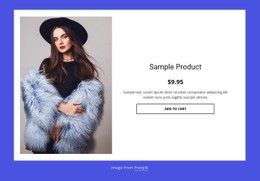
Hat CSS templates come with styling already set up for catalog grids and product cards, so you mostly need to fit them to your photos. A store that carries felt fedoras next to baseball caps needs cards that look related while each shape keeps its own proportions.
Adjustable Grids, Image Frames, and Hat Cards
Headwear is awkward to show in a uniform grid. A wide straw brim needs horizontal room, a cap reads best in profile so the visor shows, and a tall felt crown pushes the picture upward. Because most catalogs mix model shots with plain product photos, one crop rule rarely works for all of them. Watch how the image containers respond to cases like these:
- A wide-brim raffia hat clipped by a square frame usually needs a contained fit mode and a bit more padding.
- A baseball cap shot from the side looks lost in a tall portrait card unless the aspect ratio can change per collection.
- A close-up of straw weave suits a cover crop, while the full shot beside it needs the whole silhouette visible.
A pale card flatters natural straw, but dark felt and bright sports caps often need a deeper tone, with size labels that stay readable on both.
Reusable Rules on Narrow Screens
A solid template styles its cards with shared classes, so a new run of caps doesn't mean formatting each card by hand. CSS Grid places the cards across the row, and Flexbox keeps the title and size note steady inside each one. "Straw Boater" fits on one line, while "Handwoven Wide-Brim Raffia Sun Hat" wraps onto two lines and can push its head-circumference range below the neighboring cards. On smaller screens, brims still need side room as the columns narrow.
Navy and charcoal felt swatches can look almost identical in small circles, so written names and a visible selected state help. Styling changes only their appearance, though, and picking a variant with live stock needs its own setup.
Custom CSS Inside Nicepage
You can add the Custom CSS to assign an element class and add custom styles at the element, page, or site level. A featured card for a new felt collection can then get its own border and shadow while typography follows the site rules. Nicepage does not run those rules inside the editor, so check the result and any conflicts with built-in styling in Preview.
The real test of a hat CSS template comes with the next collection. If its styles take in a batch of tall top hats or flat-brimmed snapbacks after a few small edits, you picked well.