
Overlap Block CSS Templates
-

-

-
-
-
-
-
-
-
-
-
-
-
-
-
-
-
-
-
-
-
-
-
-
-
-
-
-
-
-
-
-
-
-
-
-
-
-
-
-
-
Build Website with no CodingDownload
-
-
-
-
-
-
-










































Clean Overlap Block CSS Templates for Layered Section Styling
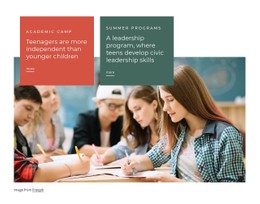
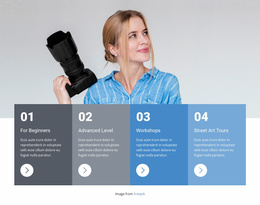
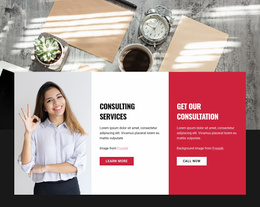
Overlap Block CSS Templates focus on the styling and layout behavior that make crossing elements feel intentional. Images, text cards, and background panels may occupy different visual layers, while positioning, stacking, offsets, and spacing determine how clearly those layers relate to one another.
This makes the CSS context broader than colors or typography alone. The prepared section provides a starting structure, and CSS-level adjustments can refine where elements sit, which layer appears in front, and how the overlap changes across different screen widths.
Which CSS Details Matter Most in an Overlap Layout?
A clear overlap depends on several coordinated decisions:
- positioning controls where the foreground element crosses the image or panel;
- stacking and layer order keep the intended card, image, or background in front;
- offsets and spacing determine how pronounced the intersection feels;
- contrast and backgrounds preserve readability where content layers meet.
These details work together. A strong foreground panel can still feel awkward if its offset is too large, while an attractive background can become distracting if text loses contrast against the image underneath.
Use Ready-Made CSS Layouts as a Starting Point
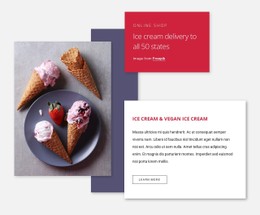
An Overlap Block CSS template gives you a prepared composition that can be restyled rather than a blank canvas. A typical section may include a large visual, a compact card, a colored support panel, and a short action area.
From there, the styling can be adapted to the project. You might change the card background, reduce the horizontal offset, adjust the visible image area, or refine padding so the overlap feels more balanced with the new content.
Nicepage Elements and Blocks provide pre-designed content parts for assembling this type of layout. When a project needs an extra styling detail beyond the visual editor settings, Custom CSS can provide additional control.
Refine Layer Order and Responsive Offsets
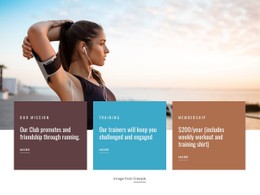
Layer order becomes important when several elements occupy the same area. The foreground card needs to remain visually dominant, decorative backgrounds should stay behind content, and the image should not unexpectedly cover text or actions.
Responsive behavior matters just as much. A desktop composition may use a wide horizontal offset, while a tablet or phone version needs a smaller crossing distance or a partial stack. Instead of forcing one arrangement everywhere, keep the same visual relationship with different spacing values.
Useful checks include:
- whether the foreground panel still reads as the top layer;
- whether image content remains visible after the offset changes;
- whether text and buttons keep enough breathing room on narrow screens.
Keep CSS Adjustments Specific to the Overlap
Extra CSS is most useful when it solves a clear layout or styling need inside the composition. For example, a project may need a smaller card offset on tablets, a different stacking order for a decorative panel, or extra padding where a foreground card crosses a photo.
That is more relevant than adding generic styling rules that could apply unchanged to almost any section. The best adjustments support the exact relationship between the foreground element, visual anchor, and background layer.
Distinguish Overlap from Other Layered Patterns
Layered Images is built primarily around multiple images stacking or intersecting. An Overlap Block can mix images with text cards, color fields, and other content panels.
Over Grid uses repeated cells as its visible base. An Overlap Block can be more open and asymmetrical because it does not depend on a grid remaining visible underneath the foreground layer.
Overlap Block CSS Template FAQ
Can I Add Custom CSS for an Overlap Layout?
Yes. Nicepage supports Custom CSS when additional styling control is needed. It can be useful for a project-specific offset, stacking detail, padding adjustment, background treatment, or responsive refinement.
What Should I Check When Elements Overlap on Smaller Screens?
Check the layer order, card offset, image visibility, text contrast, and surrounding spacing. The desktop intersection may need to become smaller or more vertical on narrow screens.
Are There Pre-Designed Elements for Building the Section?
Yes. Nicepage provides pre-designed Elements and Blocks that can be placed and adapted on the visual canvas with your own text, images, colors, and supporting content.
How Is an Overlap Block Different from Layered Images?
An Overlap Block can combine different content types, such as an image with a text card or color panel. Layered Images is defined more specifically by multiple images stacking, offsetting, or intersecting with one another.
Refine the Section with Focused CSS Control
Choose a layout whose basic layering already suits the content, then adjust the details that affect the intersection: position, visible edge, spacing, stacking order, and responsive offset. Use Custom CSS only where additional control is useful, and keep each change tied to the clarity and balance of the layered composition.






















































