
Painting HTML Templates
A mural case study needs the brief, wall size, materials, and finished result in a predictable order. Painting HTML templates group these details into readable sections that work across screen sizes.
-
-

-
-
-
-
-
-
-
-
-
Free Website Builder SoftwareDownload
-
-
-
-
-
-
-
-
-
-
-
-
-
-
-












More HTML Templates from Art & Design Category













Other Art & Design HTML Templates
Clean Painting HTML Templates for Artworks and Studio Projects
A painting HTML template saves you from having to invent a structure for every canvas you publish. A good one arrives with a collection heading, repeatable artwork cards, and room for the facts a collector asks about first, so most of the work is replacing demo content. The result is editable files you can export, host yourself, or pass to a developer.
Prebuilt HTML Layouts Worth Looking For
Depending on what you publish, one of these prebuilt layouts usually makes the better starting point:
- A gallery of repeatable artwork cards with space for the title, medium, and size of each piece
- An exhibition layout that places the show title, dates, and venue above the works
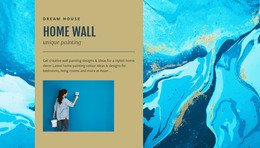
- A project layout for a mural or restoration, where process photos lead up to the finished wall
- A service layout for interior painting with a room photo, the coating used, and an estimate link
A repeatable card suits a set of small botanical studies, yet it struggles with a restoration job that requires several sequential stages. A short series of watercolors, on the other hand, may need nothing more than images with captions.
Replacing Demo Artwork Before Exporting
You do not have to touch the source to customize a painting template. The Page Navigator lets you reorder and duplicate blocks, so a new portrait gets the same card as the rest of its series. The Nicepage Image Element includes an SEO Alt field, described in its Image Element documentation. A line such as "blue abstract seascape with broad horizontal brushstrokes" tells visitors and search engines far more than "painting image."
Before exporting, it pays to check the finished layout in this order:
- Heading levels that run from the collection down to each work
- Alt text on every painting, written from what the image shows
- Links from artwork cards to commission details or a contact block
- Reading order on a phone, where each image stays next to its title and description
Moving Finished Files onto Hosting
Nicepage exports the project with its HTML pages, scripts, and images, so an exhibition or portfolio can live on standard web hosting without a CMS. A developer can take the same files further, though adding online sales or other dynamic features is extra work. Full-resolution scans of large canvases are usually the heaviest part of the export, so resizing them before upload helps loading time more than any markup tweak.
The template that fits is the one whose files you could publish now and still edit comfortably when the next series is finished.