
Adult Website Templates
Schools, adult education providers, and recreational activity organizers need connected pages for programs, schedules, and instructor details. Ready-made website templates provide a practical starting structure for presenting these services and helping visitors locate relevant information.











































































Other Team Website Templates
Adult Website Templates for Multi-Page Projects
Adult website templates help establish a coherent site from ready-made page designs, whether the project is a modest activity website or a larger education service. Compare how a proposed homepage, program page, and contact page would look together, rather than judging the homepage in isolation.
Decide Which Information Deserves Its Own Page
Begin with the content visitors need to find. An education center may benefit from a program overview linked to course details and instructor backgrounds. A smaller activity organizer can use a concise homepage with a companion contact page. In either case, select layouts whose typography, imagery, and page headers can feel like parts of the same site.
These are suggested content roles, not pages guaranteed in every design. Check the available previews and consider whether additional pages can follow the chosen visual style without extensive redesign.
Compare Designs Actually Found in the Adult Collection
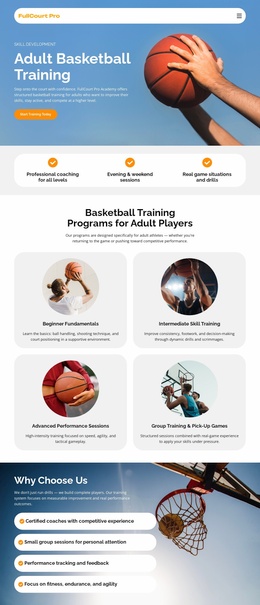
The collection includes Adult Basketball Training and Activities For Children And Adults. These titles represent different subjects worth comparing, not proof that either design comes with a complete multi-page set. Open their previews and review the imagery, information density, and existing content sections. A basketball project may need space for skill-level explanations, while a shared-activities page may depend more on photographs and short participation details.
When comparing designs, imagine the same identity extending from an introduction to a detailed activity page: are the image treatments compatible, can headings carry longer titles, and do calls to action feel consistent? A simpler starting design may be preferable if it adapts well across those connected pages.
For a larger program-led project, consider these distinct page roles:
- Homepage: Introduce the organization and its primary activity.
- Program overview: Help visitors compare available options.
- Program detail: Explain requirements and session information.
- About: Present the people behind the service.
- Contact: Make inquiries and location details easy to find.
- Updates: Reserve space for timely announcements when needed.
Keep Navigation Proportionate to the Site
Once a design is selected, use Nicepage to replace demonstration content, create any missing pages, and connect them through clear navigation. Page Folders can help manage a growing set of pages, but they are not a reason to add unnecessary levels to a small site.
An education center can link directly from its course overview to individual descriptions, while a neighborhood recreation group might keep everything in a compact site. The goal is a consistent visitor experience across the pages that exist, not a prescribed minimum number of pages.