
Pest Html Code Examples
After an inspection page moves into a property manager's website, its images, styles, and contact form must still work. With pest HTML code, developers can inspect the exported files and test the actual inquiry route.

More Html Code Examples from Real Estate Category





Other Real Estate Html Code Examples
Pest HTML Code
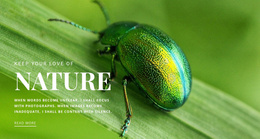
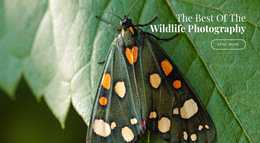
Pest HTML code examples on Nicepage start with finished designs such as Green Beetle and African Butterflies, both built around insect and nature photography. Here, the focus is on how the photo, the heading, and the link fit together in the markup. You can adapt a ready example, export the whole project as HTML, or add your own markup and scripts through the HTML Element. Scheduling or a CRM connection would be separate work on top of any example.
Inside an Insect Photo Block
In a block like African Butterflies, the image sets the subject, the heading names it, and the Read More link leads somewhere more detailed. A sensible order for reworking that block looks like this:
- Replace the image file, confirm its path, and rewrite the "alt" text so it describes the insect actually shown.
- Change the heading to name the real subject, such as a beetle species or a service you offer.
- Keep the paragraph near the sample length, since a much longer passage can push the button below the photo on a phone.
- Point the Read More link at a destination that exists, such as a species description.
A list of common species calls for a repeating card pattern with an image, name, and description in each card, while an introduction needs one strong visual block.
Exported Files and Hand Edits
Exporting creates a folder or ZIP archive with the HTML and every file and image it relies on, so moving only the HTML file leaves the page without its photos. Hand edits to exported files stay outside the Nicepage project, and exporting again into the same folder will overwrite them. To keep the two versions in step, work in this order:
- Make content and layout changes in the Nicepage project, where the editor tracks them.
- Add custom markup or scripts through the HTML Element so they return with every export.
- Export, then apply only the hand edits the editor cannot make, and note each one for next time.
Final Checks After Upload
Once the files reach your server, make sure the new insect photo loads and the heading stays readable over it. Follow every link you changed, because a path that worked on your computer can break after upload. A button labeled Request Inspection does nothing on its own. For a contact form, Nicepage offers submission options for exported HTML, including a PHP email method that works once the server can send mail.
A final test on the server where the section will live tells you more than any check inside the editor.