300 Gallery Html Code Examples





































































































Gallery HTML Code Templates for Ready-Made Image Sections
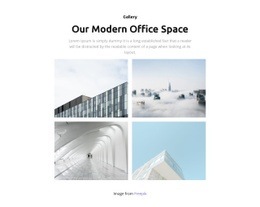
Gallery HTML Code templates in Nicepage offer ready-made image sections for HTML-oriented website projects. Compare balanced photo grids, featured-image compositions, compact collections, and captioned layouts to find a design that suits the content. The selected Gallery provides the visual foundation, while supported HTML options can complement the surrounding page when additional content is needed.
A portfolio section may need generous space for its strongest image, while a product-image group benefits from consistent views. Choose the ready-made arrangement that already fits the subject before considering specialized additions.
Ready-Made Gallery Layouts for HTML-Oriented Pages
The starting point for a Gallery HTML Code category is the appearance of the image collection. A regular grid can show a selection of comparable photographs, while a design with one prominent image can lead a portfolio story. Captions supply short context without taking attention away from the work.
- Compact collections are suitable for an overview of many images.
- Spacious arrangements emphasize detail and image quality.
- Mixed-size layouts give selected images more weight.
Nicepage's Image Gallery Element supports the main gallery presentation. HTML-related additions can be considered later if the selected page needs content beyond the photographs.
For an HTML website, choose a ready-made layout based on image proportions, visual emphasis, and caption needs. Nicepage's HTML Element can support supplementary content alongside the Gallery where appropriate, without replacing its built-in image presentation.
Gallery HTML Code FAQ
Can I add custom HTML code to a Gallery section in Nicepage?
Yes. Nicepage provides an HTML Element that can be added to a page block containing a Gallery. It supports custom HTML, CSS, and JavaScript for inserting external content or functionality alongside the image collection.
Do I need custom HTML to create an image gallery in Nicepage?
No. The built-in Image Gallery Element supports arranging multiple images, adding captions, configuring gallery layouts, and displaying enlarged previews. Custom HTML is useful when the project requires additional functionality beyond these native controls.
Can I embed an external media widget near a Gallery?
Yes. Nicepage's HTML Element supports inserting external code, including third-party components. Whether a particular widget works depends on its code and integration requirements. Test the rendered component before publishing.
Which Gallery HTML Code design suits a portfolio?
A spacious image arrangement suits a portfolio with a few standout projects. For a wider selection, choose a compact gallery that gives individual photographs consistent attention.
When should I use Gallery instead of Grid for custom HTML content?
Choose Gallery when the main purpose is browsing related photographs or other visual media. Grid is more appropriate for arranging mixed content elements. Custom HTML can supplement either structure, but it does not change their primary functions.
Find the Right Gallery HTML Code Design
A compact image group suits a broad overview, while larger photographs are effective when individual details deserve attention. Caption-friendly designs help identify selected projects or products. Choose the composition that already gives the visual material the right emphasis.