
Tractor WordPress Themes
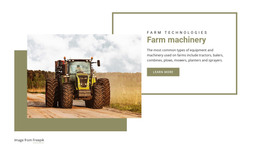
Equipment catalogs rarely stay unchanged for long. Tractor WordPress themes give machinery businesses a CMS-based design foundation to update model details, service content, dealer information, and branded site elements without rebuilding the visual structure.





More WordPress Themes from Cars & Transportation Category
-

-

-
-
-
-
-
-
-
-
-
-
-
-
-
-
-
-
-
-
-
-
-
-
-
Free Website Builder SoftwareDownload
-
-
-































Other Cars & Transportation WordPress Themes
Tractor WordPress Themes for Farm Machinery Dealers
Tractor dealers update their sites far more often than they redesign them. When a new compact series lands a few weeks before planting season, WordPress lets the staff put it online the same day. The theme decides whether those pages look like they belong. For a farm machinery business, that takes ready layouts for the model catalog and individual tractor pages. Parts and service sections matter just as much, along with quote forms for each dealer location.
What Dealers Change Most Often
After launch, a dealer's routine edits usually fall into a few groups:
- a new series, which needs its own archive, model cards, and comparison data;
- attachments, since each loader or mower must list the models and hitch categories it fits;
- used tractors, each listed with engine hours, year, and condition;
- dealer contacts, from regional phone numbers to seasonal service schedules.
Used machines work well as posts in categories such as compact and utility, since a sold tractor leaves the archive once its post is unpublished.
Model Cards With Matching Spec Rows
Buyers compare tractors side by side, and that only works when every page puts the same numbers in the same place. If horsepower sits under the photo on one page and at the bottom of the next, people stop comparing and start calling. In a theme demo, check these layouts first:
- model cards with a photo, horsepower, and drivetrain in fixed spots;
- model pages where engine, transmission, and PTO figures keep the same rows;
- an implements block linking each tractor to compatible loaders and mowers;
- a clear route from each model to parts, service, and a dealer inquiry.
With those layouts in place, a new model slots into its family looking just like its neighbors, even when someone from the parts counter does the editing. Dealers who sell filters and belts online should also see how the theme handles WooCommerce products.
Leaving Inventory Updates to WordPress
On a tractor site, the navigation, product grids, and model page layout barely change from year to year. Specs, photos, and availability change constantly. A good theme locks down the first group and leaves the second to WordPress. With Nicepage, you design the theme in the Desktop Application and export it to WordPress. The Nicepage plugin then lets you adjust Site Style settings such as colors and fonts right in the admin area.
Before installing a theme, picture the site two planting seasons from now, with extra series and more parts and service pages. If model cards, archives, and inquiry routes can take on that growth as everyday WordPress content, the theme suits a working dealership.