Modern Bus Travel WordPress Theme


Edit Template Offline
2. Create new page and search for id 6651956
Edit Template Online
Create Awesome Websites


Free Nicepage Builder
Keywords
Destination Cards and Fleet Entries Create Reusable WordPress Content Areas
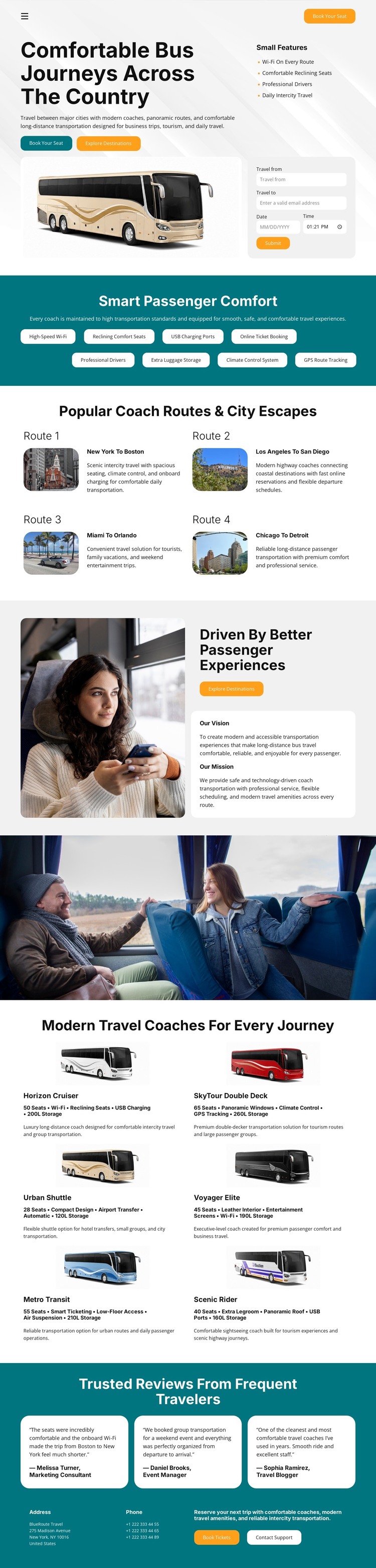
The four route cards are the strongest page-oriented content group in this design. Each combines a named journey, destination imagery, and descriptive copy, giving a WordPress project a clear way to organize travel information around individual route concepts without claiming that Posts, categories, or other WordPress structures already exist. The opening trip-planning panel and the “Explore Destinations” action can remain connected to that destination-focused content.
The fleet area adds a different kind of recurring material. Six coach entries contain vehicle names, images, passenger and luggage specifications, and descriptions of travel suitability, so they can be interpreted as a reusable information pattern for vehicle or service content. The four comfort highlights provide shorter benefit-oriented content, while the passenger-experience section supplies a broader page message. Three traveler review cards and the closing support area add customer-facing reassurance and assistance content to the same visual system. This combination suits a WordPress-managed site where permanent page content and later updated material may need to coexist around a consistent theme, but it does not prove that a blog or post area is present. The design’s main contribution is a coordinated arrangement of route, fleet, comfort, review, and support content that can be adapted to the CMS environment.
Customize with Nicepage
Open this ready-made template in the WordPress Website Builder and customize it visually in the Nicepage editor. Replace demo content, edit page sections, and adapt the design to your project without rebuilding the template from scratch.
Manage and Edit This Theme in WordPress
Customize and Install the WordPress Theme
Start with this ready-made theme instead of building the WordPress design from scratch. Customize its layout, content, typography, images, sections, and other design elements visually in Nicepage editor, then export and install the WordPress Theme, Plugin, and Pages on your WordPress site. The Nicepage WordPress Plugin lets you continue working with the site after installation.
Edit the Theme Directly in WordPress
After installation, you can edit the WordPress Theme directly in WordPress with the Nicepage WordPress Plugin. Use Site Style to customize site Colors, Fonts, Header, Footer, Blog, and Post Page Templates while working within your WordPress website.
Edit WordPress Pages Visually
Use the Nicepage WordPress Plugin to edit page content directly from the WordPress admin area. Open a WordPress Page with Nicepage and visually change its text, images, sections, and other page elements while continuing to manage the Page through WordPress.
WordPress Content and Theme Integration
Use the customized theme with WordPress Pages, Posts, Blog and Post Templates, menus, widgets, and other CMS-managed content. Shared theme elements such as Colors, Fonts, Header, Footer, Blog, and Post Page Templates can be managed as part of the overall site design, while WordPress provides the CMS environment for managing site content.
This workflow combines a ready-made WordPress Theme with visual customization, direct theme editing in WordPress, and continued content management through the Nicepage WordPress Plugin.