
Spooky Html Code Examples
An independent horror premiere needs a poster, trailer, and cast information, but the venue developer also needs usable files. Spooky HTML code makes that seasonal teaser easier to extend, export, and verify after deployment.



More Html Code Examples from Text On Image Category









Other Text On Image Html Code Examples
Clean and Spooky HTML Code Examples for Haunted and Horror Pages
Spooky HTML code examples cover dark seasonal sections, from a haunted-house banner to a row of costume portraits. In Nicepage, each one opens in the editor as a ready design. Write code only for what the editor lacks, and export gives you the markup to edit directly.
Markup Inside an Eerie Section
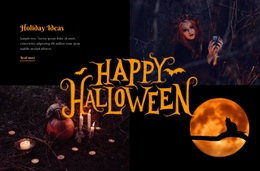
Take a haunted-house promo block, where HTML decides which elements appear and in what order. A heading names the attraction, an image shows the house, and a short paragraph with one link leads to the details. The image's alt text should describe the scene for screen reader users. One Halloween block in the catalog follows this pattern, pairing a "Holiday Ideas" heading and a "Read more" link with three photo panels.
Halloween Art Gallery has no captions under its three portraits, so after export each image can go inside a "figure" with a "figcaption" naming the artist. For anything beyond standard elements, the HTML Element accepts your own markup and scripts. Its output appears only in Preview or after publishing, and scripts there should not contain comments.
Typical spooky additions for this element include:
- a trailer player for a horror film teaser
- a social feed with visitors' costume photos
- a clip of creaking floorboards that waits for a click, since most browsers block sound that starts on its own
Nicepage takes no responsibility for third-party code, so test each widget on its own first.
Taking Finished Files to Another Server
Export works from the desktop apps and the Online Editor. The package includes the HTML files, plus the scripts and images they rely on. The files aren't tied to Nicepage Hosting so that you can move them to your own server. Hand edits live only in those files, and a new project export won't carry them over. Routine visual changes belong in the editor, while direct edits suit embed settings or element IDs. Setting the Folder URL Format to Relative keeps links working in a subfolder of an existing site.
Broken Paths, Oversized Iframes, Silent Players
After upload, open the pages on the server and confirm that every image path resolves, the lightbox opens, and no player stays silent. A trailer iframe with a fixed pixel width can spill past the edge of a phone screen. If the video service has no flexible embed, hide the HTML Element in mobile views and add a plain link instead. The page is finished once the haunted banner, the captions, and every embed work on the live server.