Spa and massage studio WordPress Theme


Seasonal Offers Translate Into Stable WordPress Page Content
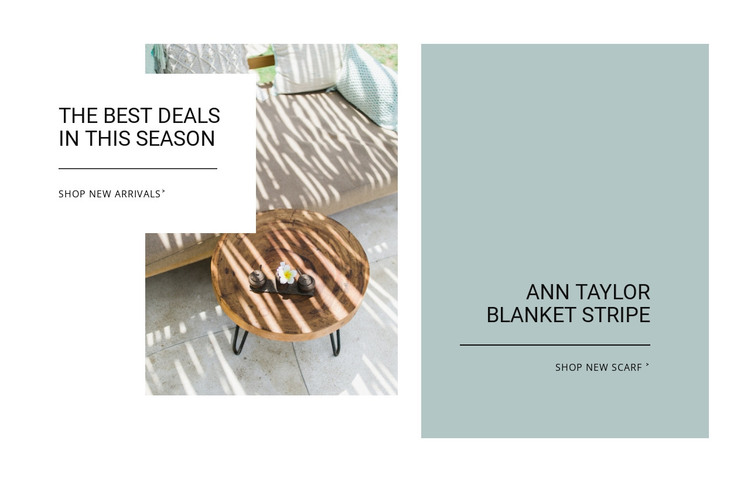
The two panels read naturally as a reusable promotional area within a WordPress-managed page. The left panel carries the broader seasonal message through a lifestyle image, the overlaid heading “the best deals In this season,” and the “shop new arrivals” link. Its white text treatment keeps the offer visually tied to the image rather than presenting it as an isolated text item. The divider adds a simple boundary between the message and its shopping action.
The right panel supplies a different kind of page content: a named “Ann Taylor Blanket Stripe” promotion on a muted blue-gray background, with centered black typography and a separate “shop new Scarf” link. Because the panels use different visual treatments but the same basic heading-divider-action logic, they can be read as related promotional entries within a broader retail page. The arrangement supports seasonal content that needs two distinct destinations without requiring a dense product listing.
In a WordPress-oriented project, this block can occupy a stable section of a page while surrounding content handles navigation, product detail, editorial material, or other store information. The section’s value lies in its clear content grouping: one image-led offer and one text-led offer, both bounded by their own actions. That makes the block suitable for a page area that may be updated as promotions change while retaining a recognizable visual pattern.
Customize with Nicepage
Open this ready-made template in the WordPress Website Builder and customize it visually in the Nicepage editor. Replace demo content, edit page sections, and adapt the design to your project without rebuilding the template from scratch.
Edit Template Offline
2. Create a new page or select existing
3. Click Add new block, search for id 133266 and click enter
Edit Template Online
Create Awesome Websites


Free Nicepage Builder
Keywords
Manage and Edit This Theme in WordPress
Customize and Install the WordPress Theme
Start with this ready-made theme instead of building the WordPress design from scratch. Customize its layout, content, typography, images, sections, and other design elements visually in Nicepage editor, then export and install the WordPress Theme, Plugin, and Pages on your WordPress site. The Nicepage WordPress Plugin lets you continue working with the site after installation.
Edit the Theme Directly in WordPress
After installation, you can edit the WordPress Theme directly in WordPress with the Nicepage WordPress Plugin. Use Site Style to customize site Colors, Fonts, Header, Footer, Blog, and Post Page Templates while working within your WordPress website.
Edit WordPress Pages Visually
Use the Nicepage WordPress Plugin to edit page content directly from the WordPress admin area. Open a WordPress Page with Nicepage and visually change its text, images, sections, and other page elements while continuing to manage the Page through WordPress.
WordPress Content and Theme Integration
Use the customized theme with WordPress Pages, Posts, Blog and Post Templates, menus, widgets, and other CMS-managed content. Shared theme elements such as Colors, Fonts, Header, Footer, Blog, and Post Page Templates can be managed as part of the overall site design, while WordPress provides the CMS environment for managing site content.
This workflow combines a ready-made WordPress Theme with visual customization, direct theme editing in WordPress, and continued content management through the Nicepage WordPress Plugin.