Hair salon services WordPress Theme


Stable Service Content for a WordPress-Managed Page
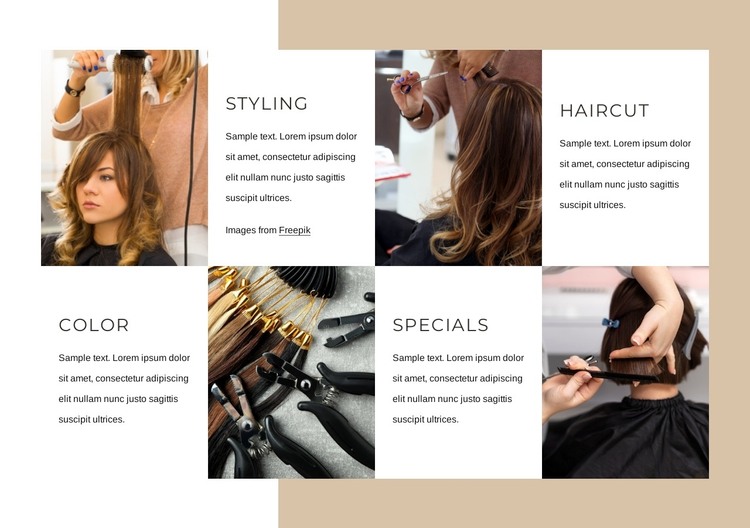
The four named areas give this block a practical permanent-content role in a WordPress-managed page. Styling, Haircut, Color, and Specials each have a supporting paragraph and a photographic image, so the section presents a defined range of services rather than time-sensitive editorial entries. The repeated structure makes the content easy to understand as one service region while the two-row layout gives each offering its own visual space.
The alternating image and white text tiles help separate description from visual context without breaking the relationship between them. A warm beige background frames the whole region, and the large uppercase headings make the four service labels easy to scan. Those choices allow the section to remain visually consistent when it appears alongside other page content managed in the broader WordPress project. The Styling attribution link remains a relevant detail of the image content and should stay associated with that tile.
This interpretation is about how the block can participate in a CMS-managed page, not about turning the section itself into a complete theme. The surrounding project can provide navigation, additional pages, and other content areas, while this block continues to carry its focused services message. Its static interaction also makes the section straightforward to maintain as page content: each service area has a recognizable heading, explanatory paragraph, and supporting image within one stable visual pattern.
Customize with Nicepage
Open this ready-made template in the WordPress Website Builder and customize it visually in the Nicepage editor. Replace demo content, edit page sections, and adapt the design to your project without rebuilding the template from scratch.
Edit Template Offline
2. Create a new page or select existing
3. Click Add new block, search for id 1292332 and click enter
Edit Template Online
Create Awesome Websites


Free Nicepage Builder
Keywords
Manage and Edit This Theme in WordPress
Customize and Install the WordPress Theme
Start with this ready-made theme instead of building the WordPress design from scratch. Customize its layout, content, typography, images, sections, and other design elements visually in Nicepage editor, then export and install the WordPress Theme, Plugin, and Pages on your WordPress site. The Nicepage WordPress Plugin lets you continue working with the site after installation.
Edit the Theme Directly in WordPress
After installation, you can edit the WordPress Theme directly in WordPress with the Nicepage WordPress Plugin. Use Site Style to customize site Colors, Fonts, Header, Footer, Blog, and Post Page Templates while working within your WordPress website.
Edit WordPress Pages Visually
Use the Nicepage WordPress Plugin to edit page content directly from the WordPress admin area. Open a WordPress Page with Nicepage and visually change its text, images, sections, and other page elements while continuing to manage the Page through WordPress.
WordPress Content and Theme Integration
Use the customized theme with WordPress Pages, Posts, Blog and Post Templates, menus, widgets, and other CMS-managed content. Shared theme elements such as Colors, Fonts, Header, Footer, Blog, and Post Page Templates can be managed as part of the overall site design, while WordPress provides the CMS environment for managing site content.
This workflow combines a ready-made WordPress Theme with visual customization, direct theme editing in WordPress, and continued content management through the Nicepage WordPress Plugin.