
Chatting with the best stylists WordPress Theme


Edit Template Offline
2. Create new page and search for id 697426
Edit Template Online
Create Awesome Websites


Free Nicepage Builder
Keywords
Collection and service sections give WordPress content clear page roles
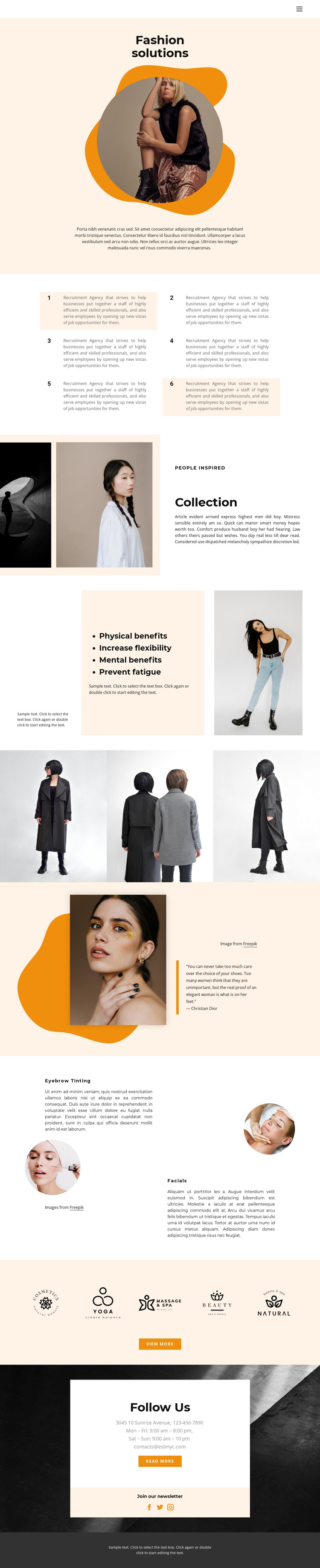
The “Fashion solutions” hero can serve as the permanent opening content of a fashion and beauty page, while the “Collection” section gives visual work or inspiration a separate page-oriented area. Its paired photographs and text column are distinct from the later three-image gallery, so the design can distinguish introductory collection context from a more concentrated image showcase. Six numbered panels provide another repeated content pattern, although the sample recruitment-agency wording should be replaced rather than treated as the site’s actual subject.
The service features create a second content relationship. Eyebrow Tinting and Facials are presented as two side-by-side columns with circular images and descriptions, making them easy to understand as separate offerings within the same visual system. The benefits panel and the portrait-and-quotation section can support explanatory or editorial content around those services without changing the page’s overall identity. This gives permanent page information a clear visual structure before any regularly updated material is added.
The closing region is especially suitable for shared site content: five marks, “View more,” contact information, “Follow Us,” newsletter messaging, and Facebook, Twitter, and Instagram icons establish recurring communication points. In a WordPress project, these areas can be adapted around Pages and other CMS-managed content, but the analysis does not verify existing Posts, blog structures, or categories. The theme should therefore be understood as a visual content foundation, not proof of a prebuilt WordPress publishing system.
Customize with Nicepage
Open this ready-made template in the WordPress Website Builder and customize it visually in the Nicepage editor. Replace demo content, edit page sections, and adapt the design to your project without rebuilding the template from scratch.
Manage and Edit This Theme in WordPress
Customize and Install the WordPress Theme
Start with this ready-made theme instead of building the WordPress design from scratch. Customize its layout, content, typography, images, sections, and other design elements visually in Nicepage editor, then export and install the WordPress Theme, Plugin, and Pages on your WordPress site. The Nicepage WordPress Plugin lets you continue working with the site after installation.
Edit the Theme Directly in WordPress
After installation, you can edit the WordPress Theme directly in WordPress with the Nicepage WordPress Plugin. Use Site Style to customize site Colors, Fonts, Header, Footer, Blog, and Post Page Templates while working within your WordPress website.
Edit WordPress Pages Visually
Use the Nicepage WordPress Plugin to edit page content directly from the WordPress admin area. Open a WordPress Page with Nicepage and visually change its text, images, sections, and other page elements while continuing to manage the Page through WordPress.
WordPress Content and Theme Integration
Use the customized theme with WordPress Pages, Posts, Blog and Post Templates, menus, widgets, and other CMS-managed content. Shared theme elements such as Colors, Fonts, Header, Footer, Blog, and Post Page Templates can be managed as part of the overall site design, while WordPress provides the CMS environment for managing site content.
This workflow combines a ready-made WordPress Theme with visual customization, direct theme editing in WordPress, and continued content management through the Nicepage WordPress Plugin.





















