Spa salon gallery WordPress Theme


Edit Template Offline
2. Create new page and search for id 6460045
Edit Template Online
Create Awesome Websites


Free Nicepage Builder
Keywords
Gallery Content Fits Around Page-Based Salon Information
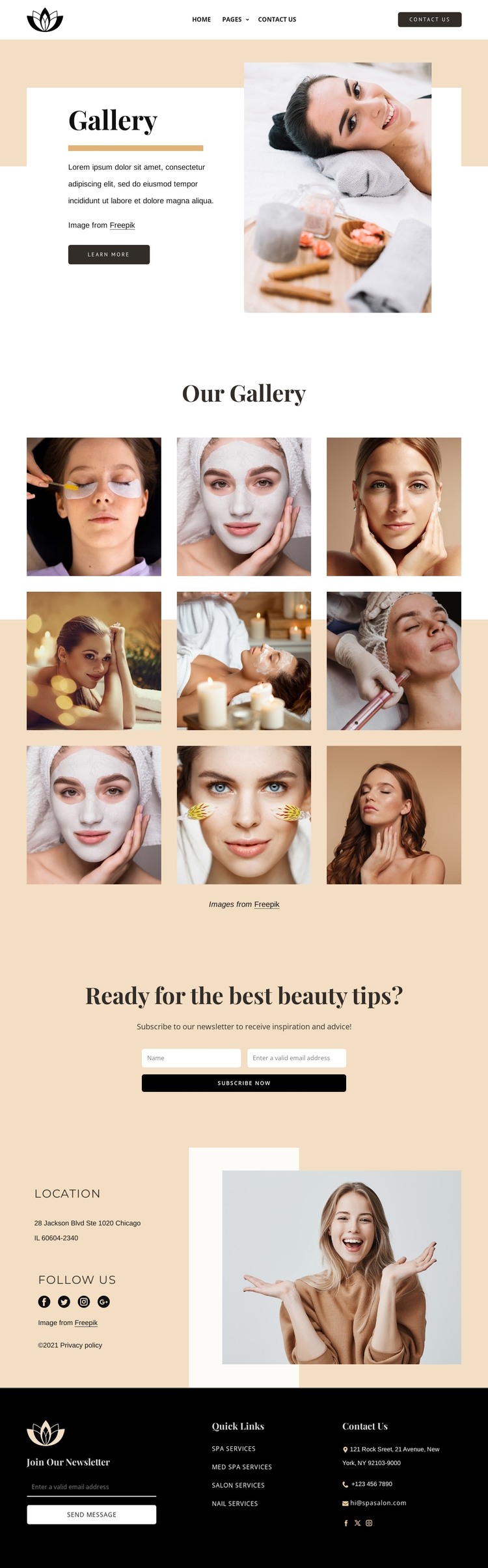
The nine-image gallery gives this design a strong permanent content area for a WordPress-managed beauty website. It can represent the visual side of the salon’s presentation, while the opening Gallery section supplies the surrounding introduction through its heading, explanatory text, large beauty image, and Learn More action. This relationship separates page-oriented context from the image collection without weakening the visual connection between them.
The service links in the footer provide another useful content grouping. Spa Services, Med SPA Services, Salon Services, and Nail Services are distinct informational directions that can remain connected to the same theme presentation as the gallery. The location section adds practical contact context and social links, giving visitors a route beyond image browsing. These verified areas can be interpreted as stable page content; the template analysis does not establish that blog posts or other WordPress-specific content already exist, so no such structure is assumed here.
Two newsletter forms create recurring communication points at different positions on the page. One appears after the main gallery with a beauty-tips invitation, and another is included in the dark footer beside quick links and contact details. That arrangement allows a WordPress project to keep editorial imagery, service information, and subscription content within one coordinated visual system. The warm neutral palette, serif headings, and compact sans-serif text provide the design language that can frame those page areas as the site’s content develops.
Customize with Nicepage
Open this ready-made template in the WordPress Website Builder and customize it visually in the Nicepage editor. Replace demo content, edit page sections, and adapt the design to your project without rebuilding the template from scratch.
Manage and Edit This Theme in WordPress
Customize and Install the WordPress Theme
Start with this ready-made theme instead of building the WordPress design from scratch. Customize its layout, content, typography, images, sections, and other design elements visually in Nicepage editor, then export and install the WordPress Theme, Plugin, and Pages on your WordPress site. The Nicepage WordPress Plugin lets you continue working with the site after installation.
Edit the Theme Directly in WordPress
After installation, you can edit the WordPress Theme directly in WordPress with the Nicepage WordPress Plugin. Use Site Style to customize site Colors, Fonts, Header, Footer, Blog, and Post Page Templates while working within your WordPress website.
Edit WordPress Pages Visually
Use the Nicepage WordPress Plugin to edit page content directly from the WordPress admin area. Open a WordPress Page with Nicepage and visually change its text, images, sections, and other page elements while continuing to manage the Page through WordPress.
WordPress Content and Theme Integration
Use the customized theme with WordPress Pages, Posts, Blog and Post Templates, menus, widgets, and other CMS-managed content. Shared theme elements such as Colors, Fonts, Header, Footer, Blog, and Post Page Templates can be managed as part of the overall site design, while WordPress provides the CMS environment for managing site content.
This workflow combines a ready-made WordPress Theme with visual customization, direct theme editing in WordPress, and continued content management through the Nicepage WordPress Plugin.