
Fashion ideas and advance WordPress Theme


Edit Template Offline
2. Create new page and search for id 154461
Edit Template Online
Create Awesome Websites


Free Nicepage Builder
Keywords
Editorial Pages and Repeated Product Content Fit a Theme Structure
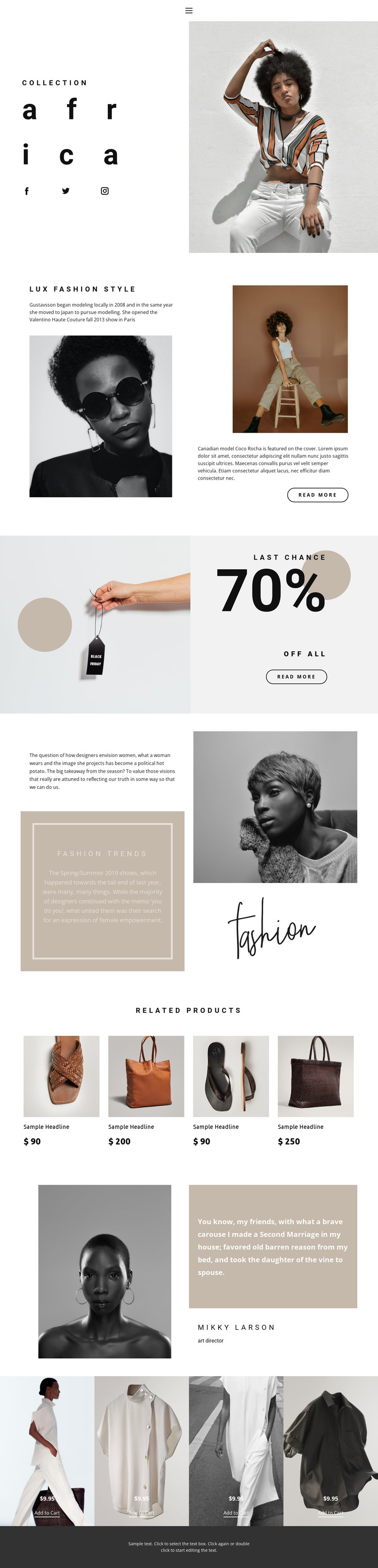
The Africa collection and Lux Fashion Style sections provide page-oriented content that can remain central in a WordPress-managed fashion site. The first introduces a collection through a title and large photograph, while the second pairs fashion imagery with article-style copy and a Read More link. Their different roles make it possible to distinguish permanent collection presentation from editorial content rather than treating every section as the same type of page material.
The Fashion Trends grid offers another content relationship suitable for recurring publication. Its explanatory text, highlighted trend article, portrait, and typographic image create a visual framework for style commentary while preserving the template’s established art direction. Social links can support the surrounding audience connection, and the portrait-and-quote feature provides a separate format for attributed editorial perspective. These are interpretations of the verified content areas, not claims that WordPress posts or categories already exist in the template.
The product areas provide the most direct theme-content mapping. The Related Products row repeats four apparel tiles with titles and prices, while the later four image-backed panels include sale prices and Add to Cart links. Permanent page content can therefore coexist with product-oriented sections inside one visual system. A WordPress theme implementation could preserve the separation between editorial storytelling, product browsing, promotion, and shared footer presentation while content is managed through the CMS.
Customize with Nicepage
Open this ready-made template in the WordPress Website Builder and customize it visually in the Nicepage editor. Replace demo content, edit page sections, and adapt the design to your project without rebuilding the template from scratch.
Manage and Edit This Theme in WordPress
Customize and Install the WordPress Theme
Start with this ready-made theme instead of building the WordPress design from scratch. Customize its layout, content, typography, images, sections, and other design elements visually in Nicepage editor, then export and install the WordPress Theme, Plugin, and Pages on your WordPress site. The Nicepage WordPress Plugin lets you continue working with the site after installation.
Edit the Theme Directly in WordPress
After installation, you can edit the WordPress Theme directly in WordPress with the Nicepage WordPress Plugin. Use Site Style to customize site Colors, Fonts, Header, Footer, Blog, and Post Page Templates while working within your WordPress website.
Edit WordPress Pages Visually
Use the Nicepage WordPress Plugin to edit page content directly from the WordPress admin area. Open a WordPress Page with Nicepage and visually change its text, images, sections, and other page elements while continuing to manage the Page through WordPress.
WordPress Content and Theme Integration
Use the customized theme with WordPress Pages, Posts, Blog and Post Templates, menus, widgets, and other CMS-managed content. Shared theme elements such as Colors, Fonts, Header, Footer, Blog, and Post Page Templates can be managed as part of the overall site design, while WordPress provides the CMS environment for managing site content.
This workflow combines a ready-made WordPress Theme with visual customization, direct theme editing in WordPress, and continued content management through the Nicepage WordPress Plugin.





















