Build stronger teams today WordPress Theme


Two Service Rows Provide Stable WordPress Page Content
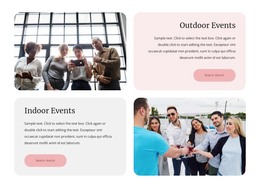
The Outdoor Events and Indoor Events headings establish two durable content units that can fit naturally into a WordPress-managed services page. Each unit carries the same basic information pattern: a category title, descriptive paragraph, event photograph, and Learn more button. This makes the block suitable for presenting permanent service information while keeping the two categories visually distinct and easy to scan.
The layout gives the content a deliberate page-section rhythm. Outdoor Events begins with its image on the left and a right-aligned text panel on the right. Indoor Events changes the order, placing the left-aligned text panel before its image. The reversed rows provide variation without changing the amount or type of information assigned to either category. Soft gray and pale lavender surfaces, rounded panels, generous spacing, and restrained serif headings support the separation of the two service areas.
In a WordPress-oriented project, this section can remain a stable visual content area while the wider site manages additional pages or changing material around it. The Learn more buttons create clear destinations for expanded event information when those links are supplied by the containing page. The sample paragraph should be replaced with project content, while the structure remains useful as a reusable services arrangement rather than representing a complete WordPress Theme.
Customize with Nicepage
Open this ready-made template in the WordPress Website Builder and customize it visually in the Nicepage editor. Replace demo content, edit page sections, and adapt the design to your project without rebuilding the template from scratch.
Edit Template Offline
2. Create a new page or select existing
3. Click Add new block, search for id 6287480 and click enter
Edit Template Online
Create Awesome Websites


Free Nicepage Builder
Keywords
Manage and Edit This Theme in WordPress
Customize and Install the WordPress Theme
Start with this ready-made theme instead of building the WordPress design from scratch. Customize its layout, content, typography, images, sections, and other design elements visually in Nicepage editor, then export and install the WordPress Theme, Plugin, and Pages on your WordPress site. The Nicepage WordPress Plugin lets you continue working with the site after installation.
Edit the Theme Directly in WordPress
After installation, you can edit the WordPress Theme directly in WordPress with the Nicepage WordPress Plugin. Use Site Style to customize site Colors, Fonts, Header, Footer, Blog, and Post Page Templates while working within your WordPress website.
Edit WordPress Pages Visually
Use the Nicepage WordPress Plugin to edit page content directly from the WordPress admin area. Open a WordPress Page with Nicepage and visually change its text, images, sections, and other page elements while continuing to manage the Page through WordPress.
WordPress Content and Theme Integration
Use the customized theme with WordPress Pages, Posts, Blog and Post Templates, menus, widgets, and other CMS-managed content. Shared theme elements such as Colors, Fonts, Header, Footer, Blog, and Post Page Templates can be managed as part of the overall site design, while WordPress provides the CMS environment for managing site content.
This workflow combines a ready-made WordPress Theme with visual customization, direct theme editing in WordPress, and continued content management through the Nicepage WordPress Plugin.