
Winning rules of fashion WordPress Theme


Edit Template Offline
2. Create new page and search for id 36786
Edit Template Online
Create Awesome Websites


Free Nicepage Builder
Keywords
Editorial Fashion Sections Give WordPress Content a Clear Visual System
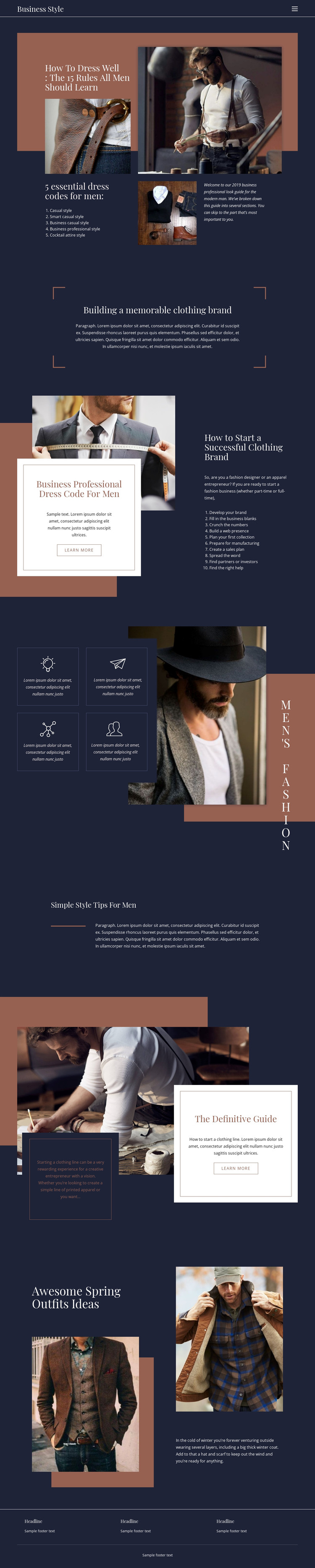
The five dress-code areas provide permanent page content with clear editorial boundaries. Casual, Smart Casual, Business Casual, Business Professional, and Cocktail Attire can organize page-oriented style guidance, while the compact navigation and shared dark header give readers a consistent way to move between related subjects. The accompanying men's fashion photography adds a visual layer without replacing the informational role of the text.
The clothing-brand guidance offers a different content relationship. A positioning statement introduces the subject, and the ten-step list develops it through brand creation, business planning, web presence, collection preparation, manufacturing, sales, promotion, and partnerships. This sequence can sit alongside fashion advice as a substantial guide area, while the four repeated feature panels provide a compact format for recurring style topics. Seasonal outfit inspiration then gives the design room for timely content that still belongs to the same visual system.
The page's dark navy, rust, cream, and muted blue palette, serif-style headings, geometric accents, and generous spacing help permanent guidance and regularly updated editorial material remain visually related. In a WordPress project, the design can therefore be interpreted around page content, recurring fashion features, and future articles without claiming that posts or blog structures already exist in the template. A WordPress theme bridge is useful here because the content areas are distinct enough to support ongoing publication while the header, footer, cards, and image treatment preserve the original fashion identity.
Customize with Nicepage
Open this ready-made template in the WordPress Website Builder and customize it visually in the Nicepage editor. Replace demo content, edit page sections, and adapt the design to your project without rebuilding the template from scratch.
Manage and Edit This Theme in WordPress
Customize and Install the WordPress Theme
Start with this ready-made theme instead of building the WordPress design from scratch. Customize its layout, content, typography, images, sections, and other design elements visually in Nicepage editor, then export and install the WordPress Theme, Plugin, and Pages on your WordPress site. The Nicepage WordPress Plugin lets you continue working with the site after installation.
Edit the Theme Directly in WordPress
After installation, you can edit the WordPress Theme directly in WordPress with the Nicepage WordPress Plugin. Use Site Style to customize site Colors, Fonts, Header, Footer, Blog, and Post Page Templates while working within your WordPress website.
Edit WordPress Pages Visually
Use the Nicepage WordPress Plugin to edit page content directly from the WordPress admin area. Open a WordPress Page with Nicepage and visually change its text, images, sections, and other page elements while continuing to manage the Page through WordPress.
WordPress Content and Theme Integration
Use the customized theme with WordPress Pages, Posts, Blog and Post Templates, menus, widgets, and other CMS-managed content. Shared theme elements such as Colors, Fonts, Header, Footer, Blog, and Post Page Templates can be managed as part of the overall site design, while WordPress provides the CMS environment for managing site content.
This workflow combines a ready-made WordPress Theme with visual customization, direct theme editing in WordPress, and continued content management through the Nicepage WordPress Plugin.





















