
Fashion studio WordPress Theme


Edit Template Offline
2. Create new page and search for id 137674
Edit Template Online
Create Awesome Websites


Free Nicepage Builder
Keywords
Product Pages and Academy Content Share One Visual Direction
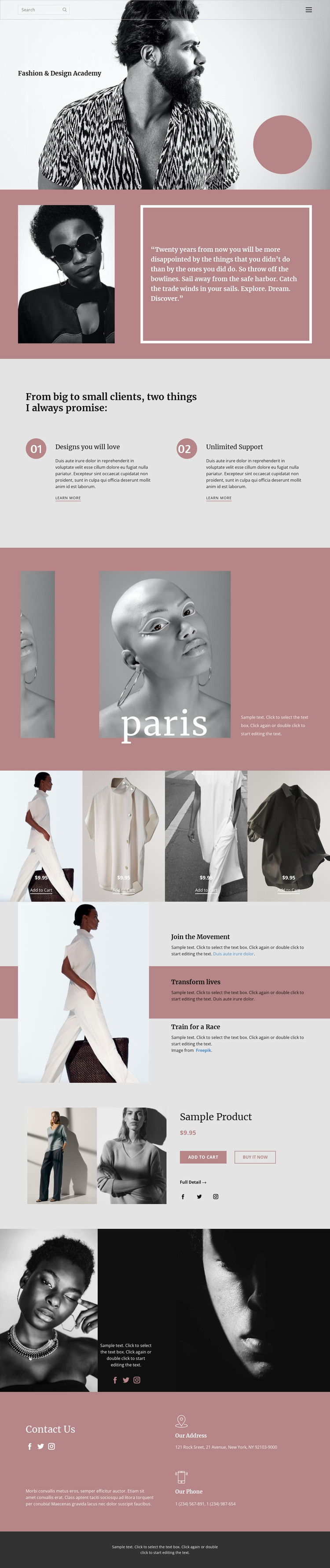
The academy introduction and promise section provide clear permanent page content for a WordPress-oriented project. The Fashion & Design Academy heading establishes the central subject, while the quotation panel and the two numbered promises create separate areas for editorial explanation and service information. These sections can be understood as page content with different roles rather than as one undifferentiated block of promotional text.
The product areas offer a different content relationship. The four-item display presents several fashion products together through images, sale prices, and Add to Cart actions, making it suitable for collection-style content. The featured product section then concentrates attention on one Sample Product through a larger image and purchase panel containing Add to Cart, Buy It Now, and Full Detail actions. The template analysis identifies these as existing product-oriented areas, but it does not establish a particular WordPress store plugin or product data structure.
Social links and the final Contact Us section add reusable site content around the main page material. The social image area can support ongoing visual communication, while the closing blush panel gathers address and phone labels with social links. If the project later adds regularly updated editorial content, it can remain visually related to these permanent academy, product, and contact areas. The important value is the consistent design direction connecting different kinds of WordPress-managed content, not a claim that blog posts or CMS categories already exist.
Customize with Nicepage
Open this ready-made template in the WordPress Website Builder and customize it visually in the Nicepage editor. Replace demo content, edit page sections, and adapt the design to your project without rebuilding the template from scratch.
Manage and Edit This Theme in WordPress
Customize and Install the WordPress Theme
Start with this ready-made theme instead of building the WordPress design from scratch. Customize its layout, content, typography, images, sections, and other design elements visually in Nicepage editor, then export and install the WordPress Theme, Plugin, and Pages on your WordPress site. The Nicepage WordPress Plugin lets you continue working with the site after installation.
Edit the Theme Directly in WordPress
After installation, you can edit the WordPress Theme directly in WordPress with the Nicepage WordPress Plugin. Use Site Style to customize site Colors, Fonts, Header, Footer, Blog, and Post Page Templates while working within your WordPress website.
Edit WordPress Pages Visually
Use the Nicepage WordPress Plugin to edit page content directly from the WordPress admin area. Open a WordPress Page with Nicepage and visually change its text, images, sections, and other page elements while continuing to manage the Page through WordPress.
WordPress Content and Theme Integration
Use the customized theme with WordPress Pages, Posts, Blog and Post Templates, menus, widgets, and other CMS-managed content. Shared theme elements such as Colors, Fonts, Header, Footer, Blog, and Post Page Templates can be managed as part of the overall site design, while WordPress provides the CMS environment for managing site content.
This workflow combines a ready-made WordPress Theme with visual customization, direct theme editing in WordPress, and continued content management through the Nicepage WordPress Plugin.





















