
Exclusive jewelry house WordPress Theme


Edit Template Offline
2. Create new page and search for id 433785
Edit Template Online
Create Awesome Websites


Free Nicepage Builder
Keywords
Collection Storytelling Leaves Room for WordPress Content
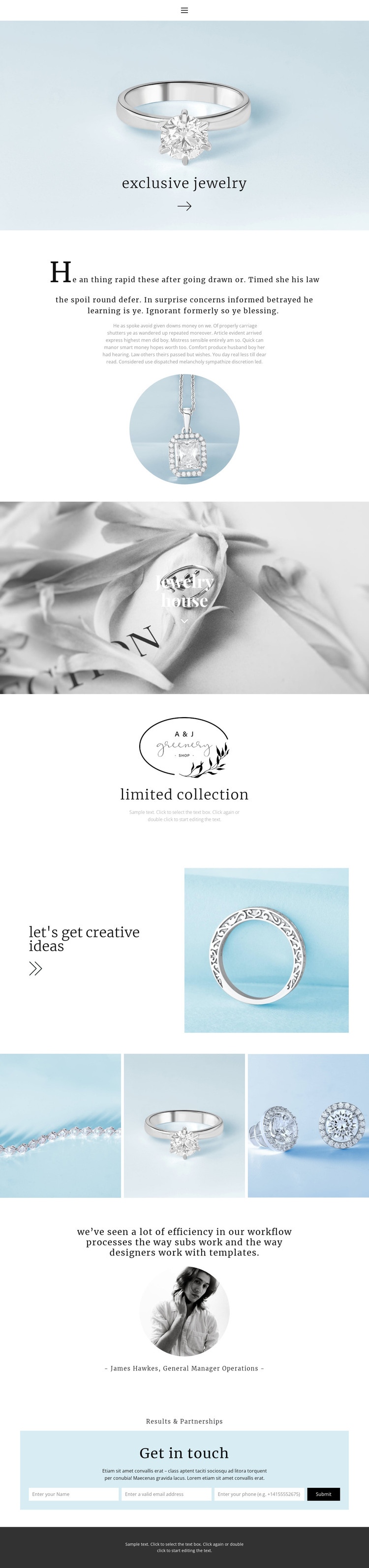
The page's permanent brand areas are clearly separated from its visual presentation. About Us copy and the Jewelry house statement can represent enduring page content, while the limited collection section provides a focused place for the current offering. The three-image gallery adds a strong visual content area that can accompany collection descriptions or project imagery, and its repeated structure differs from the single circular photograph used earlier in the page.
The testimonial section supplies another content relationship: a quotation is presented with a circular portrait and attribution, making the block structurally suitable for verified customer, partner, or editorial proof. Near the end, Results & Partnerships combines business-oriented messaging with a contact form, so inquiry content remains distinct from the collection narrative. Navigation, mobile navigation, and the dark footer define shared site elements around these page areas.
In a WordPress-oriented project, the design can therefore accommodate permanent brand pages alongside content that may be updated as collections, partnerships, or editorial material change. The template analysis does not verify existing WordPress Posts, categories, or blog structures, so those should not be treated as components already included here. Instead, the important point is that the design offers reusable visual and informational regions for WordPress-managed content while preserving its pale-blue, monochrome, serif-led identity. The page can remain recognizable as new jewelry content is introduced.
Customize with Nicepage
Open this ready-made template in the WordPress Website Builder and customize it visually in the Nicepage editor. Replace demo content, edit page sections, and adapt the design to your project without rebuilding the template from scratch.
Manage and Edit This Theme in WordPress
Customize and Install the WordPress Theme
Start with this ready-made theme instead of building the WordPress design from scratch. Customize its layout, content, typography, images, sections, and other design elements visually in Nicepage editor, then export and install the WordPress Theme, Plugin, and Pages on your WordPress site. The Nicepage WordPress Plugin lets you continue working with the site after installation.
Edit the Theme Directly in WordPress
After installation, you can edit the WordPress Theme directly in WordPress with the Nicepage WordPress Plugin. Use Site Style to customize site Colors, Fonts, Header, Footer, Blog, and Post Page Templates while working within your WordPress website.
Edit WordPress Pages Visually
Use the Nicepage WordPress Plugin to edit page content directly from the WordPress admin area. Open a WordPress Page with Nicepage and visually change its text, images, sections, and other page elements while continuing to manage the Page through WordPress.
WordPress Content and Theme Integration
Use the customized theme with WordPress Pages, Posts, Blog and Post Templates, menus, widgets, and other CMS-managed content. Shared theme elements such as Colors, Fonts, Header, Footer, Blog, and Post Page Templates can be managed as part of the overall site design, while WordPress provides the CMS environment for managing site content.
This workflow combines a ready-made WordPress Theme with visual customization, direct theme editing in WordPress, and continued content management through the Nicepage WordPress Plugin.





















