
Winning ideas for fashion WordPress Theme
Edit Template Offline
2. Create new page and search for id 38169
Edit Template Online
Create Awesome Websites


Free Nicepage Builder
Keywords
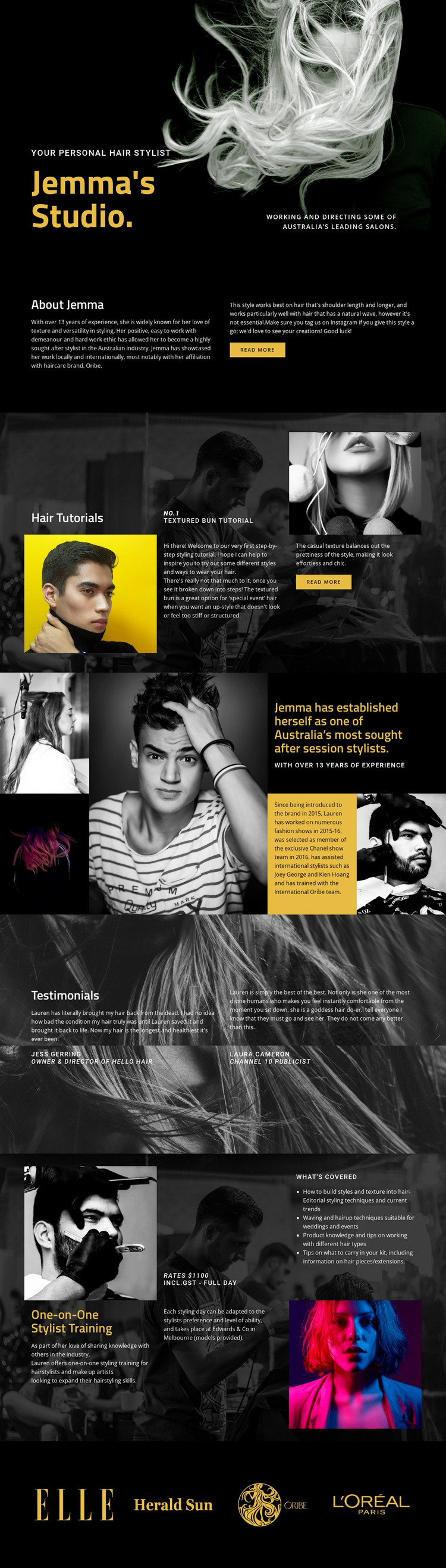
Tutorial content and permanent studio information share one visual system
The page divides naturally into permanent information areas that can be interpreted within a WordPress-managed content environment. Jemma’s Studio, the personal stylist introduction, and About Jemma provide page-oriented profile content, while Hair Tutorials supplies a separate editorial direction through the Textured Bun Tutorial, supporting photography, step-by-step copy, and a read-more action. These areas have different roles but remain connected by the same dark, image-led design.
The session-stylist section adds professional positioning through portrait imagery and contrasting statement panels. Two attributed testimonials can support that positioning as recurring proof content, while the One-on-One Stylist Training section gives the design a more structured service area with a Melbourne location, techniques, product knowledge, coverage details, rate information, and photography. The four closing brand or publication marks work as a shared association area rather than as another article-like block. This combination suits a project where permanent studio and training information may sit alongside regularly updated tutorial or editorial material. The template analysis verifies those content areas, but it does not verify existing WordPress Posts, categories, or blog structures; therefore the interpretation stays focused on how the design’s page content can accommodate managed material instead of claiming that specific CMS elements are already present.
Customize with Nicepage
Open this ready-made template in the WordPress Website Builder and customize it visually in the Nicepage editor. Replace demo content, edit page sections, and adapt the design to your project without rebuilding the template from scratch.
Manage and Edit This Theme in WordPress
Customize and Install the WordPress Theme
Start with this ready-made theme instead of building the WordPress design from scratch. Customize its layout, content, typography, images, sections, and other design elements visually in Nicepage editor, then export and install the WordPress Theme, Plugin, and Pages on your WordPress site. The Nicepage WordPress Plugin lets you continue working with the site after installation.
Edit the Theme Directly in WordPress
After installation, you can edit the WordPress Theme directly in WordPress with the Nicepage WordPress Plugin. Use Site Style to customize site Colors, Fonts, Header, Footer, Blog, and Post Page Templates while working within your WordPress website.
Edit WordPress Pages Visually
Use the Nicepage WordPress Plugin to edit page content directly from the WordPress admin area. Open a WordPress Page with Nicepage and visually change its text, images, sections, and other page elements while continuing to manage the Page through WordPress.
WordPress Content and Theme Integration
Use the customized theme with WordPress Pages, Posts, Blog and Post Templates, menus, widgets, and other CMS-managed content. Shared theme elements such as Colors, Fonts, Header, Footer, Blog, and Post Page Templates can be managed as part of the overall site design, while WordPress provides the CMS environment for managing site content.
This workflow combines a ready-made WordPress Theme with visual customization, direct theme editing in WordPress, and continued content management through the Nicepage WordPress Plugin.





















