
Get the hottest styles WordPress Theme


Edit Template Offline
2. Create new page and search for id 243942
Edit Template Online
Create Awesome Websites


Free Nicepage Builder
Keywords
Editorial Stories and Visual Collections Fit WordPress Page Content
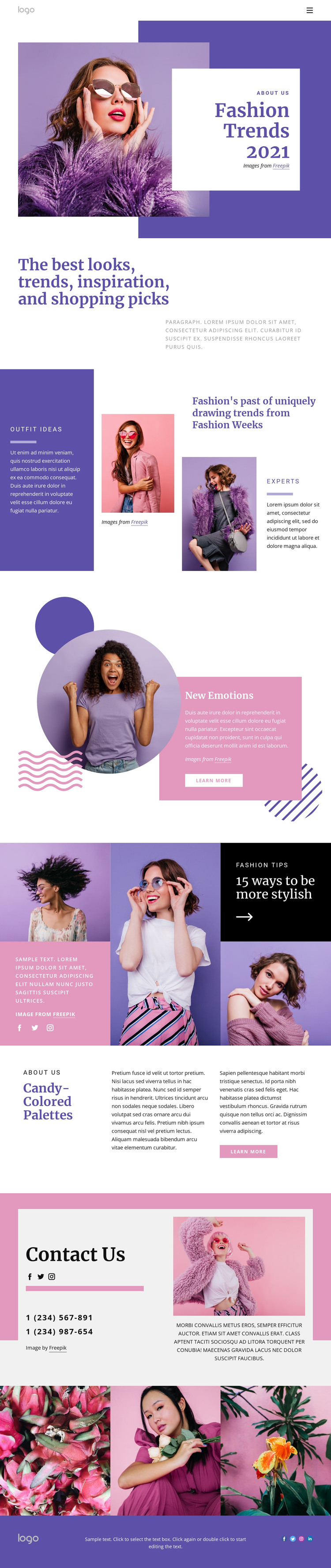
The page separates its fashion subject into several content areas that can be interpreted naturally within a WordPress-managed site. The opening hero and introductory headline provide permanent page-oriented content about trends, looks, inspiration, and shopping picks. The Fashion Week section then adds a more developed editorial relationship between outfit ideas, an image, and experts content, giving the design a clear place for a feature story rather than only a promotional banner.
The “New Emotions” block offers another reusable story pattern: a portrait, colored geometric accents, supporting text, and a Learn more button work together as a featured item. The “15 ways to be more stylish” area presents advice through multiple photographs and contrasting panels, while “Candy-Colored Palettes” provides longer supporting commentary. These sections could accommodate changing fashion content while preserving the page’s visual direction; the analysis does not establish that WordPress Posts, categories, or blog templates already exist.
The contact area contributes permanent communication content through two displayed phone numbers, social links, and a fashion image. The three-image gallery provides a separate visual collection, and the footer keeps branding and social navigation visible at the close. This combination lets WordPress-oriented page content, future editorial material, and shared site elements remain within one recognizable fashion theme without reducing the interpretation to a CMS name change.
Customize with Nicepage
Open this ready-made template in the WordPress Website Builder and customize it visually in the Nicepage editor. Replace demo content, edit page sections, and adapt the design to your project without rebuilding the template from scratch.
Manage and Edit This Theme in WordPress
Customize and Install the WordPress Theme
Start with this ready-made theme instead of building the WordPress design from scratch. Customize its layout, content, typography, images, sections, and other design elements visually in Nicepage editor, then export and install the WordPress Theme, Plugin, and Pages on your WordPress site. The Nicepage WordPress Plugin lets you continue working with the site after installation.
Edit the Theme Directly in WordPress
After installation, you can edit the WordPress Theme directly in WordPress with the Nicepage WordPress Plugin. Use Site Style to customize site Colors, Fonts, Header, Footer, Blog, and Post Page Templates while working within your WordPress website.
Edit WordPress Pages Visually
Use the Nicepage WordPress Plugin to edit page content directly from the WordPress admin area. Open a WordPress Page with Nicepage and visually change its text, images, sections, and other page elements while continuing to manage the Page through WordPress.
WordPress Content and Theme Integration
Use the customized theme with WordPress Pages, Posts, Blog and Post Templates, menus, widgets, and other CMS-managed content. Shared theme elements such as Colors, Fonts, Header, Footer, Blog, and Post Page Templates can be managed as part of the overall site design, while WordPress provides the CMS environment for managing site content.
This workflow combines a ready-made WordPress Theme with visual customization, direct theme editing in WordPress, and continued content management through the Nicepage WordPress Plugin.





















