
Ralph Lauren fashion WordPress Theme


Edit Template Offline
2. Create new page and search for id 27456
Edit Template Online
Create Awesome Websites


Free Nicepage Builder
Keywords
Collection Stories and Repeated Looks Fit a Content-Led Theme Structure
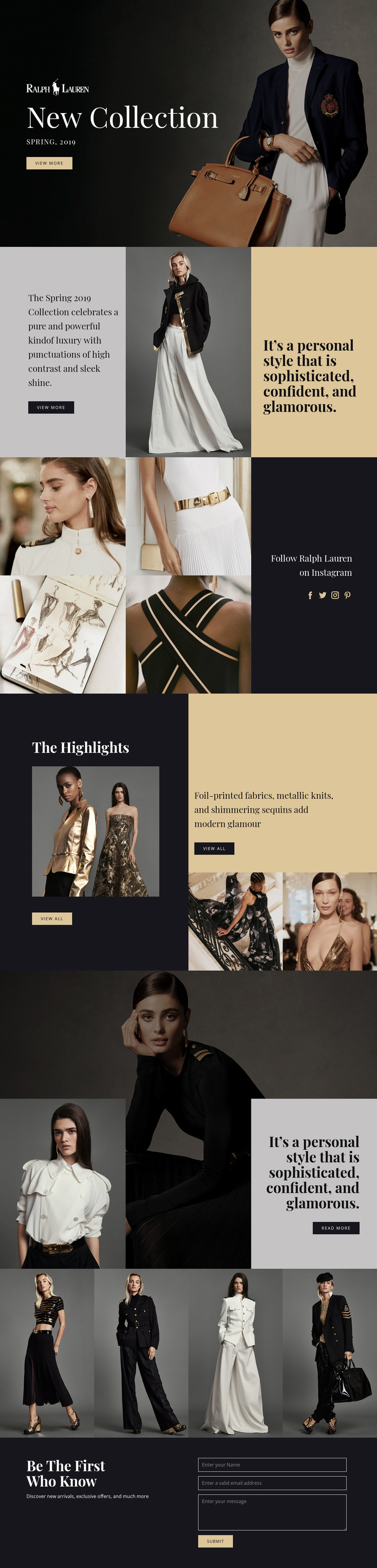
The page’s permanent content areas are clearly separated. The New Collection hero can carry the main seasonal message through its campaign image, Spring label, heading, and View more action. The split introduction then provides a place for collection description, supporting fashion imagery, and a personal-style statement. These page-oriented areas are distinct from the repeated visual content that follows, making the design suitable for a content environment where editorial messages and image selections may evolve over time.
The first gallery presents four fashion images beside a dark panel containing the Instagram invitation and social icons. The Highlights section focuses on selected collection content through featured imagery, material and embellishment descriptions, supporting photographs, and View all actions. A second gallery supplies four additional looks, while the over-grid composition combines portraits, a campaign photograph, and a statement card. Together, these areas create a relationship between enduring collection information and recurring visual presentation without assuming that blog posts or other CMS structures already exist.
The final newsletter block gives the theme a clear update-oriented content area. Its copy about new arrivals and exclusive offers sits alongside the subscription form, providing a natural place for current campaign messaging and visitor responses. In a WordPress-managed project, the design could therefore support permanent collection pages and changing editorial content within one visual direction. The important value is the mapping between the verified page areas and managed content, not simply adding the name of the CMS to a generic fashion description.
Customize with Nicepage
Open this ready-made template in the WordPress Website Builder and customize it visually in the Nicepage editor. Replace demo content, edit page sections, and adapt the design to your project without rebuilding the template from scratch.
Manage and Edit This Theme in WordPress
Customize and Install the WordPress Theme
Start with this ready-made theme instead of building the WordPress design from scratch. Customize its layout, content, typography, images, sections, and other design elements visually in Nicepage editor, then export and install the WordPress Theme, Plugin, and Pages on your WordPress site. The Nicepage WordPress Plugin lets you continue working with the site after installation.
Edit the Theme Directly in WordPress
After installation, you can edit the WordPress Theme directly in WordPress with the Nicepage WordPress Plugin. Use Site Style to customize site Colors, Fonts, Header, Footer, Blog, and Post Page Templates while working within your WordPress website.
Edit WordPress Pages Visually
Use the Nicepage WordPress Plugin to edit page content directly from the WordPress admin area. Open a WordPress Page with Nicepage and visually change its text, images, sections, and other page elements while continuing to manage the Page through WordPress.
WordPress Content and Theme Integration
Use the customized theme with WordPress Pages, Posts, Blog and Post Templates, menus, widgets, and other CMS-managed content. Shared theme elements such as Colors, Fonts, Header, Footer, Blog, and Post Page Templates can be managed as part of the overall site design, while WordPress provides the CMS environment for managing site content.
This workflow combines a ready-made WordPress Theme with visual customization, direct theme editing in WordPress, and continued content management through the Nicepage WordPress Plugin.





















