Professional beauty treatments WordPress Theme



Edit Template Offline
2. Create new page and search for id 5793331
Edit Template Online
Create Awesome Websites


Free Nicepage Builder
Keywords
Treatment Categories Separate Permanent Page Content From Ongoing Contact
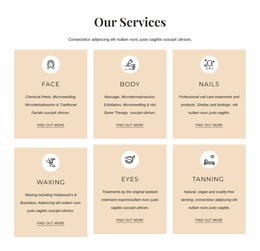
The nine treatment cards provide the clearest page-oriented content structure in this design. Face, Body, Nails, Waxing, Eyes, Tanning, Threading, Electrolysis, and Pulsed Light are each presented as a distinct service category with circular imagery, short descriptions, and a Find out more link. That arrangement gives permanent salon information a consistent visual home while leaving room for the wording and images to be maintained as the business develops.
The downloadable full treatment menu complements those page sections by offering a deeper reference beyond the brief card descriptions. The opening split section supplies the broader context, pairing skincare and hair removal content with a treatment image and Learn More action before visitors reach the individual categories. Newsletter forms create recurring communication points, while the location panel and dark footer group contact links, quick links, phone and email details, and social links around the service content.
For a WordPress-oriented project, this combination is useful because it distinguishes stable service information from communication and navigation areas that may continue to change. The visual language can remain consistent around those content groups rather than treating every update as a new design problem. The template therefore offers a structured theme direction for a salon site whose core pages explain treatments, provide the full menu, invite subscriptions, and keep contact pathways visible.
Customize with Nicepage
Open this ready-made template in the WordPress Website Builder and customize it visually in the Nicepage editor. Replace demo content, edit page sections, and adapt the design to your project without rebuilding the template from scratch.
Manage and Edit This Theme in WordPress
Customize and Install the WordPress Theme
Start with this ready-made theme instead of building the WordPress design from scratch. Customize its layout, content, typography, images, sections, and other design elements visually in Nicepage editor, then export and install the WordPress Theme, Plugin, and Pages on your WordPress site. The Nicepage WordPress Plugin lets you continue working with the site after installation.
Edit the Theme Directly in WordPress
After installation, you can edit the WordPress Theme directly in WordPress with the Nicepage WordPress Plugin. Use Site Style to customize site Colors, Fonts, Header, Footer, Blog, and Post Page Templates while working within your WordPress website.
Edit WordPress Pages Visually
Use the Nicepage WordPress Plugin to edit page content directly from the WordPress admin area. Open a WordPress Page with Nicepage and visually change its text, images, sections, and other page elements while continuing to manage the Page through WordPress.
WordPress Content and Theme Integration
Use the customized theme with WordPress Pages, Posts, Blog and Post Templates, menus, widgets, and other CMS-managed content. Shared theme elements such as Colors, Fonts, Header, Footer, Blog, and Post Page Templates can be managed as part of the overall site design, while WordPress provides the CMS environment for managing site content.
This workflow combines a ready-made WordPress Theme with visual customization, direct theme editing in WordPress, and continued content management through the Nicepage WordPress Plugin.