
Personal shopper service WordPress Theme


Edit Template Offline
2. Create new page and search for id 23188
Edit Template Online
Create Awesome Websites


Free Nicepage Builder
Keywords
Collection Sections Give WordPress Content a Clear Retail Context
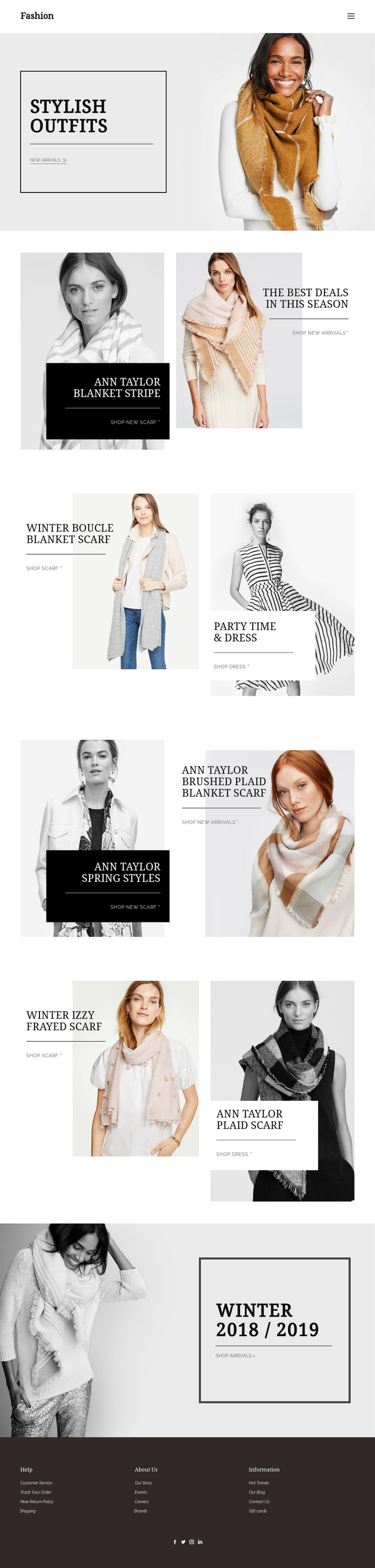
The page separates fashion content into recognizable editorial areas that can translate naturally into a WordPress-managed site. Stylish Outfits provides the introductory collection message, while Blanket Stripe, Winter Boucle Blanket Scarf, and Winter Izzy Frayed Scarf give accessory-led content distinct promotional contexts. Party Time & Dress adds a separate apparel direction, and Spring Styles with plaid accessories introduces a seasonal variation without changing the design character.
That separation is useful for content that may evolve over time. A retailer could treat the existing sections as page-oriented collection content, then connect each shopping link to the appropriate new-arrivals, scarf, dress, or seasonal destination. This is an interpretation of the verified content areas, not a claim that WordPress posts, categories, or product records already exist in the template. The shared header and footer can continue to frame those areas as the site grows.
The footer provides an additional content map through Customer Service, Track Your Order, returns, shipping, Our Story, Events, Careers, Brands, Hot Trends, Our Blog, Contact Us, and Gift cards. That mix gives the design room for both permanent information and regularly updated retail material while keeping the editorial imagery, serif typography, dark promotional panels, and understated calls to action consistent across the WordPress-oriented project.
Customize with Nicepage
Open this ready-made template in the WordPress Website Builder and customize it visually in the Nicepage editor. Replace demo content, edit page sections, and adapt the design to your project without rebuilding the template from scratch.
Manage and Edit This Theme in WordPress
Customize and Install the WordPress Theme
Start with this ready-made theme instead of building the WordPress design from scratch. Customize its layout, content, typography, images, sections, and other design elements visually in Nicepage editor, then export and install the WordPress Theme, Plugin, and Pages on your WordPress site. The Nicepage WordPress Plugin lets you continue working with the site after installation.
Edit the Theme Directly in WordPress
After installation, you can edit the WordPress Theme directly in WordPress with the Nicepage WordPress Plugin. Use Site Style to customize site Colors, Fonts, Header, Footer, Blog, and Post Page Templates while working within your WordPress website.
Edit WordPress Pages Visually
Use the Nicepage WordPress Plugin to edit page content directly from the WordPress admin area. Open a WordPress Page with Nicepage and visually change its text, images, sections, and other page elements while continuing to manage the Page through WordPress.
WordPress Content and Theme Integration
Use the customized theme with WordPress Pages, Posts, Blog and Post Templates, menus, widgets, and other CMS-managed content. Shared theme elements such as Colors, Fonts, Header, Footer, Blog, and Post Page Templates can be managed as part of the overall site design, while WordPress provides the CMS environment for managing site content.
This workflow combines a ready-made WordPress Theme with visual customization, direct theme editing in WordPress, and continued content management through the Nicepage WordPress Plugin.





















