Beauty and aesthetic treatments WordPress Theme



Edit Template Offline
2. Create new page and search for id 5788558
Edit Template Online
Create Awesome Websites


Free Nicepage Builder
Keywords
Treatment Content and Editorial Sections Fit a WordPress Site Structure
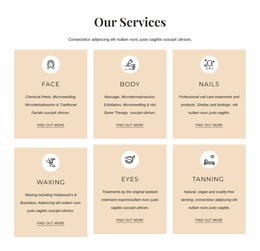
The six service cards create a stable page-oriented content group for the salon: Face, Body, Nails, Waxing, Eyes, and Tanning are separated into repeated items rather than buried in the introductory copy. That makes the design suitable for presenting permanent treatment information while leaving the About Salon, Our Values, Our Story, and What We Do sections to carry broader editorial content about the salon and its approach.
The treatment-menu download and newsletter forms add two different kinds of ongoing content interaction. The menu prompt points visitors toward a fuller treatment resource, while the subscription form and footer signup support communication beyond the immediate page visit. The dark section’s Book Now action and the Contacts area provide clear response and contact contexts, with social links helping connect the page to the salon’s wider presence.
For a WordPress-managed project, these relationships can support a visual system around permanent pages and content that may be updated over time. The analysis does not verify WordPress Pages, Posts, categories, or a blog inside this template, so those are not presented as existing components. The confirmed value is the separation of service, editorial, resource, form, contact, and shared footer areas, which can be mapped to the project’s chosen WordPress content structure without reducing the design to a CMS label.
Customize with Nicepage
Open this ready-made template in the WordPress Website Builder and customize it visually in the Nicepage editor. Replace demo content, edit page sections, and adapt the design to your project without rebuilding the template from scratch.
Manage and Edit This Theme in WordPress
Customize and Install the WordPress Theme
Start with this ready-made theme instead of building the WordPress design from scratch. Customize its layout, content, typography, images, sections, and other design elements visually in Nicepage editor, then export and install the WordPress Theme, Plugin, and Pages on your WordPress site. The Nicepage WordPress Plugin lets you continue working with the site after installation.
Edit the Theme Directly in WordPress
After installation, you can edit the WordPress Theme directly in WordPress with the Nicepage WordPress Plugin. Use Site Style to customize site Colors, Fonts, Header, Footer, Blog, and Post Page Templates while working within your WordPress website.
Edit WordPress Pages Visually
Use the Nicepage WordPress Plugin to edit page content directly from the WordPress admin area. Open a WordPress Page with Nicepage and visually change its text, images, sections, and other page elements while continuing to manage the Page through WordPress.
WordPress Content and Theme Integration
Use the customized theme with WordPress Pages, Posts, Blog and Post Templates, menus, widgets, and other CMS-managed content. Shared theme elements such as Colors, Fonts, Header, Footer, Blog, and Post Page Templates can be managed as part of the overall site design, while WordPress provides the CMS environment for managing site content.
This workflow combines a ready-made WordPress Theme with visual customization, direct theme editing in WordPress, and continued content management through the Nicepage WordPress Plugin.