Tips to stop sugar cravings WordPress Theme


Stable Editorial Content for a Nutrition Page
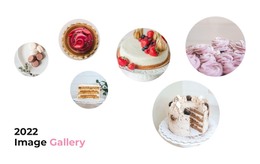
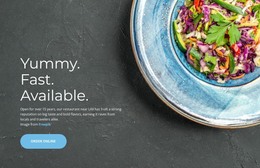
The heading and supporting sentence give this section the character of permanent informational content rather than a time-sensitive list of updates. The heading presents ten simple ways to manage sugar cravings according to a nutritionist, and the supporting text adds the specific references to five minutes of mindfulness and lemon juice. Seven food and beverage images then provide visual context, arranged across three vertical columns with different image counts. The structure creates a recognizable nutrition feature that can remain part of a broader page as surrounding content changes.
The centered read-more button gives visitors a clear route toward additional information, while the white background and centered dark typography keep the section easy to place within an existing page design. Generous spacing separates the editorial introduction from the staggered gallery, and the small teal button provides a restrained action accent beneath the images. These relationships make the block useful as publishable page content without treating its sample wording or photographs as a complete article, service, or website.
In a WordPress-oriented project, the section can serve as a stable visual region on a nutrition, healthy-eating, or editorial page while the wider site manages other content around it. Its role is defined by the combination of topic, supporting detail, repeated images, and onward-reading action. WordPress provides the broader content environment; this block contributes one finished section whose internal layout and visual treatment remain intact.
Customize with Nicepage
Open this ready-made template in the WordPress Website Builder and customize it visually in the Nicepage editor. Replace demo content, edit page sections, and adapt the design to your project without rebuilding the template from scratch.
Edit Template Offline
2. Create a new page or select existing
3. Click Add new block, search for id 67847 and click enter
Edit Template Online
Create Awesome Websites


Free Nicepage Builder
Keywords
Manage and Edit This Theme in WordPress
Customize and Install the WordPress Theme
Start with this ready-made theme instead of building the WordPress design from scratch. Customize its layout, content, typography, images, sections, and other design elements visually in Nicepage editor, then export and install the WordPress Theme, Plugin, and Pages on your WordPress site. The Nicepage WordPress Plugin lets you continue working with the site after installation.
Edit the Theme Directly in WordPress
After installation, you can edit the WordPress Theme directly in WordPress with the Nicepage WordPress Plugin. Use Site Style to customize site Colors, Fonts, Header, Footer, Blog, and Post Page Templates while working within your WordPress website.
Edit WordPress Pages Visually
Use the Nicepage WordPress Plugin to edit page content directly from the WordPress admin area. Open a WordPress Page with Nicepage and visually change its text, images, sections, and other page elements while continuing to manage the Page through WordPress.
WordPress Content and Theme Integration
Use the customized theme with WordPress Pages, Posts, Blog and Post Templates, menus, widgets, and other CMS-managed content. Shared theme elements such as Colors, Fonts, Header, Footer, Blog, and Post Page Templates can be managed as part of the overall site design, while WordPress provides the CMS environment for managing site content.
This workflow combines a ready-made WordPress Theme with visual customization, direct theme editing in WordPress, and continued content management through the Nicepage WordPress Plugin.