Bowl menu WordPress Theme


Edit Template Offline
2. Create new page and search for id 6083111
Edit Template Online
Create Awesome Websites


Free Nicepage Builder
Keywords
Menu Content, Food Imagery, and Signup Fit a Managed Restaurant Theme
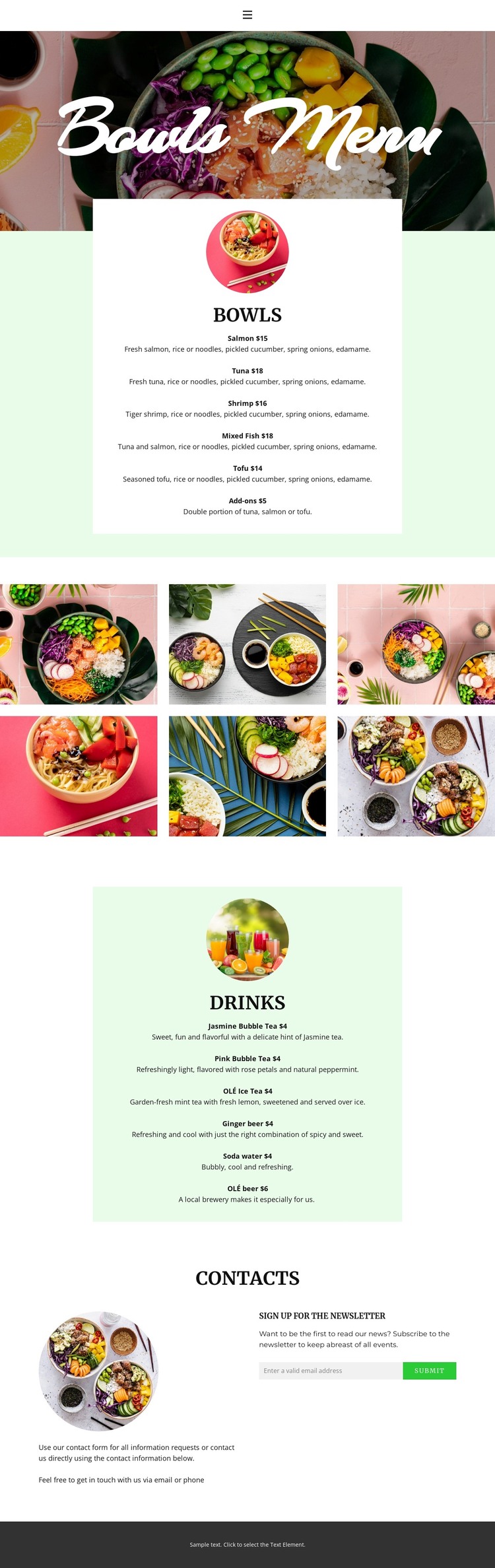
The bowls section supplies the page-oriented content core of this design. Its centered white card groups salmon, tuna, shrimp, mixed fish, tofu, and add-ons beneath a circular food image, making the category easy to treat as permanent restaurant information. The drinks card provides a second content area with bubble tea, iced tea, ginger beer, soda water, and beer. Together, these two lists give a WordPress project distinct page content that can be revised as offerings change without losing the relationship between categories.
The six-image gallery contributes a separate visual content stream. It can represent the restaurant’s food presentation while remaining different from the text-heavy menu cards, giving the theme a place for image-led content alongside page information. The compact navigation links—Home, About, Gallery, and Contact—also indicate how visitors can move between core content areas, while the dark footer supplies a shared closing region for site-wide information.
The contact section connects the permanent menu presentation with ongoing communication through explanatory text and a newsletter signup panel. In a WordPress-oriented project, that distinction is useful: the menu and gallery describe the restaurant, while the signup area supports content updates or announcements without changing the page’s visual character. The design does not verify blog posts or WordPress-specific content structures, so those should be added only if the project requires them rather than assumed to be part of the template.
Customize with Nicepage
Open this ready-made template in the WordPress Website Builder and customize it visually in the Nicepage editor. Replace demo content, edit page sections, and adapt the design to your project without rebuilding the template from scratch.
Manage and Edit This Theme in WordPress
Customize and Install the WordPress Theme
Start with this ready-made theme instead of building the WordPress design from scratch. Customize its layout, content, typography, images, sections, and other design elements visually in Nicepage editor, then export and install the WordPress Theme, Plugin, and Pages on your WordPress site. The Nicepage WordPress Plugin lets you continue working with the site after installation.
Edit the Theme Directly in WordPress
After installation, you can edit the WordPress Theme directly in WordPress with the Nicepage WordPress Plugin. Use Site Style to customize site Colors, Fonts, Header, Footer, Blog, and Post Page Templates while working within your WordPress website.
Edit WordPress Pages Visually
Use the Nicepage WordPress Plugin to edit page content directly from the WordPress admin area. Open a WordPress Page with Nicepage and visually change its text, images, sections, and other page elements while continuing to manage the Page through WordPress.
WordPress Content and Theme Integration
Use the customized theme with WordPress Pages, Posts, Blog and Post Templates, menus, widgets, and other CMS-managed content. Shared theme elements such as Colors, Fonts, Header, Footer, Blog, and Post Page Templates can be managed as part of the overall site design, while WordPress provides the CMS environment for managing site content.
This workflow combines a ready-made WordPress Theme with visual customization, direct theme editing in WordPress, and continued content management through the Nicepage WordPress Plugin.