Gluten-Free Backery WordPress Theme


Edit Template Offline
2. Create new page and search for id 12547
Edit Template Online
Create Awesome Websites


Free Nicepage Builder
Keywords
Featured Offerings and Promotions Create Clear WordPress Page Content
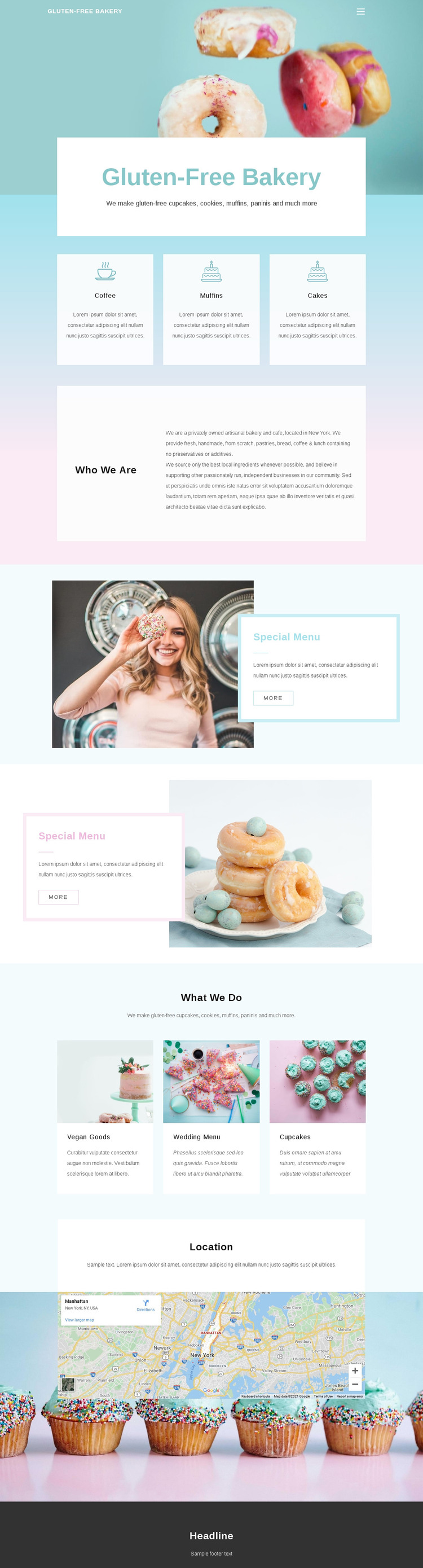
The featured product panels give the design a natural page-oriented content structure. Coffee, muffins, and cakes are presented as a coherent group, making them suitable for permanent bakery information that visitors can understand quickly. The Who We Are section serves a different role by holding background about the bakery and cafe, including the New York reference, rather than repeating product information.
The two Special Menu areas can be interpreted as recurring promotional content zones because both connect a large image with a focused text card. The What We Do cards then add vegan goods, wedding menu items, and cupcakes as a broader group of service or offering content. This distinction creates room for a WordPress project to separate stable page information from content that may be updated or expanded later, without claiming that Posts, categories, or blog structures already exist in the template. The Location section provides another permanent page area through descriptive location content and a map, while the navigation and footer support shared site elements. The design’s WordPress value therefore comes from how its concrete content areas can be organized in a CMS-managed environment, not from a generic CMS label.
Customize with Nicepage
Open this ready-made template in the WordPress Website Builder and customize it visually in the Nicepage editor. Replace demo content, edit page sections, and adapt the design to your project without rebuilding the template from scratch.
Manage and Edit This Theme in WordPress
Customize and Install the WordPress Theme
Start with this ready-made theme instead of building the WordPress design from scratch. Customize its layout, content, typography, images, sections, and other design elements visually in Nicepage editor, then export and install the WordPress Theme, Plugin, and Pages on your WordPress site. The Nicepage WordPress Plugin lets you continue working with the site after installation.
Edit the Theme Directly in WordPress
After installation, you can edit the WordPress Theme directly in WordPress with the Nicepage WordPress Plugin. Use Site Style to customize site Colors, Fonts, Header, Footer, Blog, and Post Page Templates while working within your WordPress website.
Edit WordPress Pages Visually
Use the Nicepage WordPress Plugin to edit page content directly from the WordPress admin area. Open a WordPress Page with Nicepage and visually change its text, images, sections, and other page elements while continuing to manage the Page through WordPress.
WordPress Content and Theme Integration
Use the customized theme with WordPress Pages, Posts, Blog and Post Templates, menus, widgets, and other CMS-managed content. Shared theme elements such as Colors, Fonts, Header, Footer, Blog, and Post Page Templates can be managed as part of the overall site design, while WordPress provides the CMS environment for managing site content.
This workflow combines a ready-made WordPress Theme with visual customization, direct theme editing in WordPress, and continued content management through the Nicepage WordPress Plugin.