We invent the future WordPress Theme


Stable Studio Content Across Three Page Areas
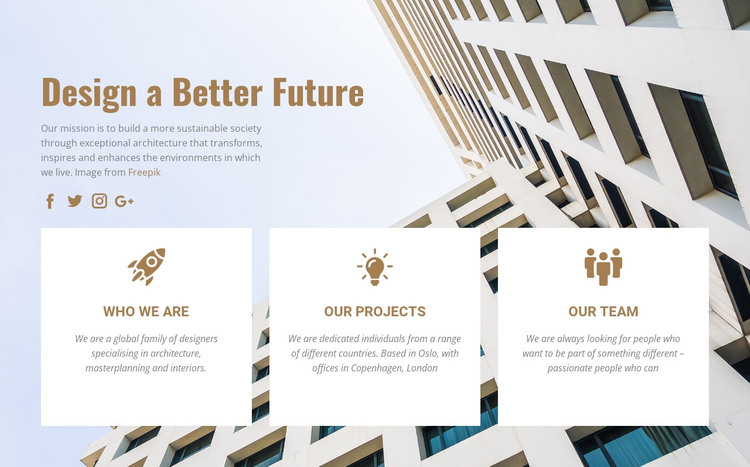
The heading “Design a Better Future” and the three labeled cards give this section a clear page-content role for a WordPress-managed architecture site. “WHO WE ARE” can hold enduring studio information, “OUR PROJECTS” can introduce a portfolio direction, and “OUR TEAM” can provide a route toward people or expertise. The block does not need to become a theme or carry the whole site; it supplies one organized content area that can sit within a broader page structure.
Its repeated card pattern supports consistent presentation: each white rectangle contains a centered brown icon, a heading, and a descriptive paragraph. The full-width architectural facade keeps the three areas visually connected, while the pale blue and white palette preserves contrast around the text. Four social media icons beneath the introductory paragraph add a compact profile layer that can remain separate from the main card content.
In WordPress context, the sample copy and image can be replaced with the project’s actual studio material while the section’s visual relationships remain intact. A wider site can place other blocks around it for detailed case studies, service explanations, or inquiries. The result is a stable, publishable section for page content, not a claim that the block itself supplies the complete WordPress theme or site structure.
Customize with Nicepage
Open this ready-made template in the WordPress Website Builder and customize it visually in the Nicepage editor. Replace demo content, edit page sections, and adapt the design to your project without rebuilding the template from scratch.
Edit Template Offline
2. Create a new page or select existing
3. Click Add new block, search for id 57274 and click enter
Edit Template Online
Create Awesome Websites


Free Nicepage Builder
Keywords
Manage and Edit This Theme in WordPress
Customize and Install the WordPress Theme
Start with this ready-made theme instead of building the WordPress design from scratch. Customize its layout, content, typography, images, sections, and other design elements visually in Nicepage editor, then export and install the WordPress Theme, Plugin, and Pages on your WordPress site. The Nicepage WordPress Plugin lets you continue working with the site after installation.
Edit the Theme Directly in WordPress
After installation, you can edit the WordPress Theme directly in WordPress with the Nicepage WordPress Plugin. Use Site Style to customize site Colors, Fonts, Header, Footer, Blog, and Post Page Templates while working within your WordPress website.
Edit WordPress Pages Visually
Use the Nicepage WordPress Plugin to edit page content directly from the WordPress admin area. Open a WordPress Page with Nicepage and visually change its text, images, sections, and other page elements while continuing to manage the Page through WordPress.
WordPress Content and Theme Integration
Use the customized theme with WordPress Pages, Posts, Blog and Post Templates, menus, widgets, and other CMS-managed content. Shared theme elements such as Colors, Fonts, Header, Footer, Blog, and Post Page Templates can be managed as part of the overall site design, while WordPress provides the CMS environment for managing site content.
This workflow combines a ready-made WordPress Theme with visual customization, direct theme editing in WordPress, and continued content management through the Nicepage WordPress Plugin.