
Innovative building art WordPress Theme


Edit Template Offline
2. Create new page and search for id 34766
Edit Template Online
Create Awesome Websites


Free Nicepage Builder
Keywords
Practice, projects, and editorial ideas within one WordPress theme direction
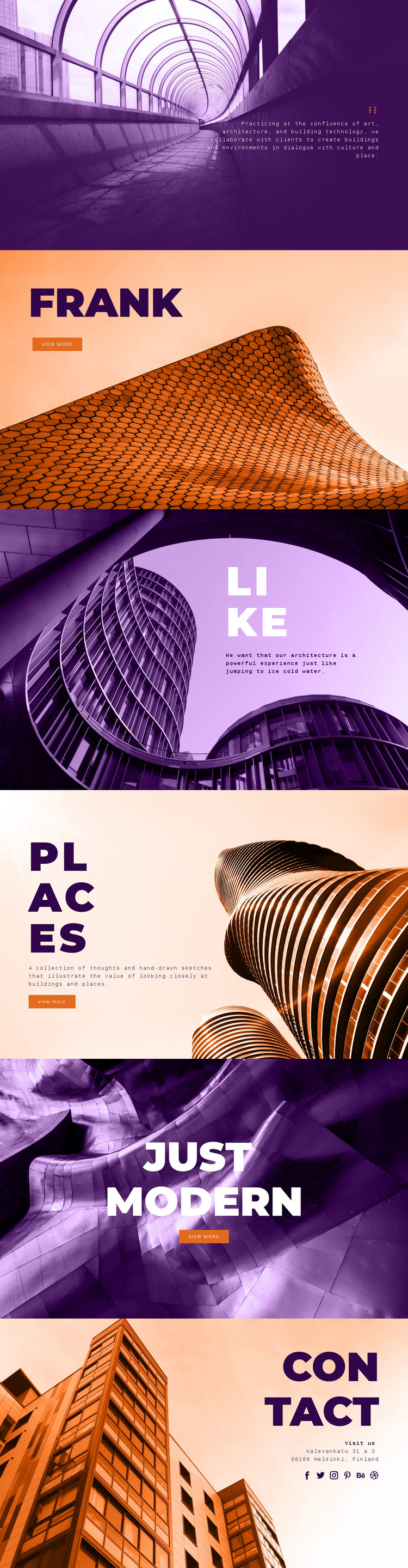
The design separates permanent practice information from recurring or expandable content in ways that suit a WordPress-managed site. Avanto can represent the core identity of the architecture practice, while the Frank Harmon panel introduces a profile-style feature. Like adds a statement about the experience of architecture, and Places frames thoughts and sketches as a distinct editorial area. Just Modern then gives a selected concept or project its own image-led presentation. These are interpretations of the verified content areas, not claims that WordPress Posts or custom content types already exist.
The three View more actions provide clear relationships between summary content and possible detailed pages or entries. That pattern is useful when a project grows to include fuller project narratives, profiles, or editorial material, because the existing visual language already distinguishes each featured subject through its heading, image, and placement. The bold geometric type, monospaced supporting text, and high-contrast purple, orange, and cream palette can continue to connect those content areas as the site develops.
The Contact panel gives the theme a separate practical destination with a Helsinki address and social links to Facebook, Twitter, Instagram, Pinterest, Behance, and Dribbble. In a WordPress interpretation, this combination supports page-oriented practice information alongside content that may be updated or expanded over time. The theme’s strongest contribution is therefore the relationship between identity, featured material, editorial thought, and contact access, rather than a claim about a pre-existing blog structure.
Customize with Nicepage
Open this ready-made template in the WordPress Website Builder and customize it visually in the Nicepage editor. Replace demo content, edit page sections, and adapt the design to your project without rebuilding the template from scratch.
Manage and Edit This Theme in WordPress
Customize and Install the WordPress Theme
Start with this ready-made theme instead of building the WordPress design from scratch. Customize its layout, content, typography, images, sections, and other design elements visually in Nicepage editor, then export and install the WordPress Theme, Plugin, and Pages on your WordPress site. The Nicepage WordPress Plugin lets you continue working with the site after installation.
Edit the Theme Directly in WordPress
After installation, you can edit the WordPress Theme directly in WordPress with the Nicepage WordPress Plugin. Use Site Style to customize site Colors, Fonts, Header, Footer, Blog, and Post Page Templates while working within your WordPress website.
Edit WordPress Pages Visually
Use the Nicepage WordPress Plugin to edit page content directly from the WordPress admin area. Open a WordPress Page with Nicepage and visually change its text, images, sections, and other page elements while continuing to manage the Page through WordPress.
WordPress Content and Theme Integration
Use the customized theme with WordPress Pages, Posts, Blog and Post Templates, menus, widgets, and other CMS-managed content. Shared theme elements such as Colors, Fonts, Header, Footer, Blog, and Post Page Templates can be managed as part of the overall site design, while WordPress provides the CMS environment for managing site content.
This workflow combines a ready-made WordPress Theme with visual customization, direct theme editing in WordPress, and continued content management through the Nicepage WordPress Plugin.





















