Building projects WordPress Theme


Edit Template Offline
2. Create new page and search for id 90610
Edit Template Online
Create Awesome Websites


Free Nicepage Builder
Keywords
Page-Oriented Services and Company Content Fit a WordPress Theme
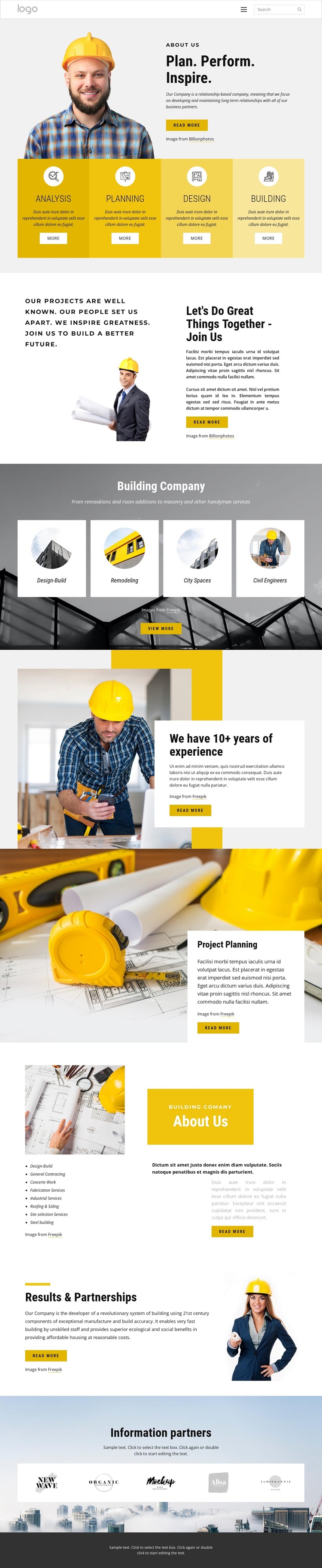
The capability and service groups provide the strongest basis for interpreting this design in a WordPress content environment. Analysis, Planning, Design, and Building introduce the company’s broad offer, while Design-Build, Remodeling, City Spaces, and Civil Engineers create a more focused set of service subjects. Those areas can remain permanent page content or become entry points to fuller service information, but the template itself does not prove that WordPress Pages or Posts are already present.
The company-oriented sections add different editorial roles. The experience statement supports background information, Project Planning gives a dedicated subject area, and the About Us split collects a longer list of services including General Contracting, Concrete Work, Fabrication Services, Industrial Services, Roofing & Siding, Site Selection Services, and Steel Building. Results & Partnerships and the five-logo partner showcase can support recurring company and relationship content. The header navigation and shared footer then provide the surrounding site context for moving between those areas.
This combination suits a WordPress theme because permanent service and company information can coexist with future content that a construction business may publish over time, while the yellow, charcoal, and image-led visual direction remains consistent. A WordPress project could use the design as a visual framework for page-oriented content and expanded updates, without assuming that blog posts, categories, or other CMS structures are already built into this specific template.
Customize with Nicepage
Open this ready-made template in the WordPress Website Builder and customize it visually in the Nicepage editor. Replace demo content, edit page sections, and adapt the design to your project without rebuilding the template from scratch.
Manage and Edit This Theme in WordPress
Customize and Install the WordPress Theme
Start with this ready-made theme instead of building the WordPress design from scratch. Customize its layout, content, typography, images, sections, and other design elements visually in Nicepage editor, then export and install the WordPress Theme, Plugin, and Pages on your WordPress site. The Nicepage WordPress Plugin lets you continue working with the site after installation.
Edit the Theme Directly in WordPress
After installation, you can edit the WordPress Theme directly in WordPress with the Nicepage WordPress Plugin. Use Site Style to customize site Colors, Fonts, Header, Footer, Blog, and Post Page Templates while working within your WordPress website.
Edit WordPress Pages Visually
Use the Nicepage WordPress Plugin to edit page content directly from the WordPress admin area. Open a WordPress Page with Nicepage and visually change its text, images, sections, and other page elements while continuing to manage the Page through WordPress.
WordPress Content and Theme Integration
Use the customized theme with WordPress Pages, Posts, Blog and Post Templates, menus, widgets, and other CMS-managed content. Shared theme elements such as Colors, Fonts, Header, Footer, Blog, and Post Page Templates can be managed as part of the overall site design, while WordPress provides the CMS environment for managing site content.
This workflow combines a ready-made WordPress Theme with visual customization, direct theme editing in WordPress, and continued content management through the Nicepage WordPress Plugin.