Architecture and design WordPress Theme


Edit Template Offline
2. Create new page and search for id 14349
Edit Template Online
Create Awesome Websites


Free Nicepage Builder
Keywords
Service categories and project cards create clear WordPress content areas
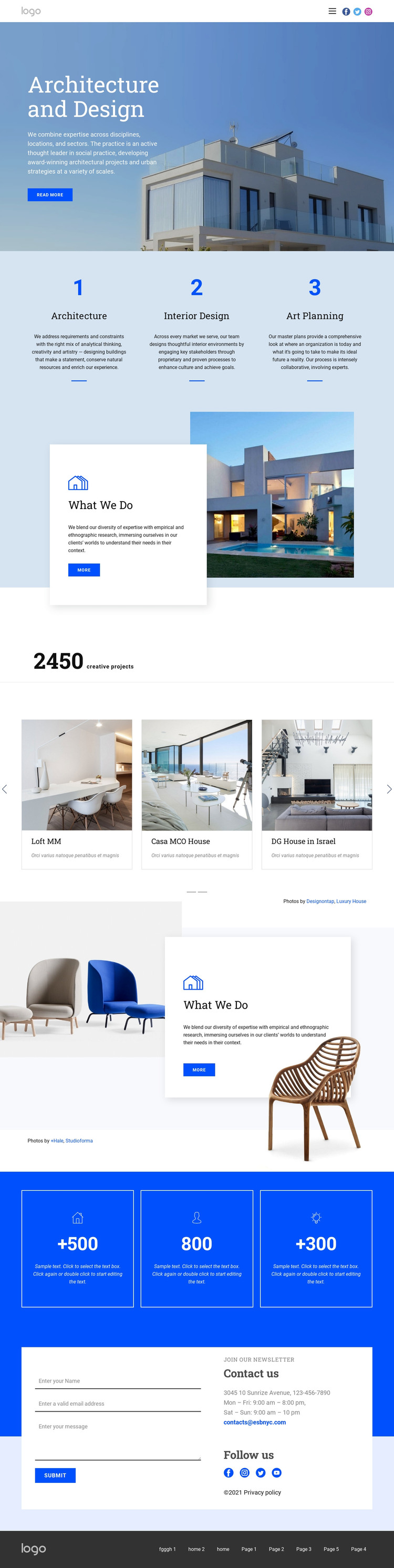
The three service columns give the design a useful page-oriented content structure. Architecture, Interior Design, and Art Planning are presented as parallel categories, so permanent practice information can remain distinct rather than being folded into the hero paragraph. The two What We Do sections add longer explanatory areas through a recurring image-and-white-card relationship, making them suitable visual regions for practice descriptions or other page content while preserving the established design character.
The selected-project carousel provides a different kind of content area. Six project cards—Loft MM, Casa MCO House, DG House in Israel, Origami Residence, Surry Hills Apartment, and Luxury House—combine imagery with labels and descriptions across two slides. These names are treated as structural demo content, not verified business records, but the repeated card pattern could accommodate project information that a practice maintains over time. The photography credit lines also demonstrate a separate supporting-content role.
The closing form and contact panels are permanent practical content, with name, email, and message inputs beside contact details and social links. A WordPress project could interpret these areas as page content within a theme while keeping the shared header and dark footer visually coordinated. The Nicepage WordPress Plugin is an optional bridge for working with such a theme, but the design’s main value comes from its separation of service, portfolio, practice, and inquiry content—not from simply attaching a CMS label.
Customize with Nicepage
Open this ready-made template in the WordPress Website Builder and customize it visually in the Nicepage editor. Replace demo content, edit page sections, and adapt the design to your project without rebuilding the template from scratch.
Manage and Edit This Theme in WordPress
Customize and Install the WordPress Theme
Start with this ready-made theme instead of building the WordPress design from scratch. Customize its layout, content, typography, images, sections, and other design elements visually in Nicepage editor, then export and install the WordPress Theme, Plugin, and Pages on your WordPress site. The Nicepage WordPress Plugin lets you continue working with the site after installation.
Edit the Theme Directly in WordPress
After installation, you can edit the WordPress Theme directly in WordPress with the Nicepage WordPress Plugin. Use Site Style to customize site Colors, Fonts, Header, Footer, Blog, and Post Page Templates while working within your WordPress website.
Edit WordPress Pages Visually
Use the Nicepage WordPress Plugin to edit page content directly from the WordPress admin area. Open a WordPress Page with Nicepage and visually change its text, images, sections, and other page elements while continuing to manage the Page through WordPress.
WordPress Content and Theme Integration
Use the customized theme with WordPress Pages, Posts, Blog and Post Templates, menus, widgets, and other CMS-managed content. Shared theme elements such as Colors, Fonts, Header, Footer, Blog, and Post Page Templates can be managed as part of the overall site design, while WordPress provides the CMS environment for managing site content.
This workflow combines a ready-made WordPress Theme with visual customization, direct theme editing in WordPress, and continued content management through the Nicepage WordPress Plugin.