
House repair and contruction WordPress Theme


Edit Template Offline
2. Create new page and search for id 60525
Edit Template Online
Create Awesome Websites


Free Nicepage Builder
Keywords
Service Categories and Repeatable Content Areas Fit a WordPress Theme Foundation
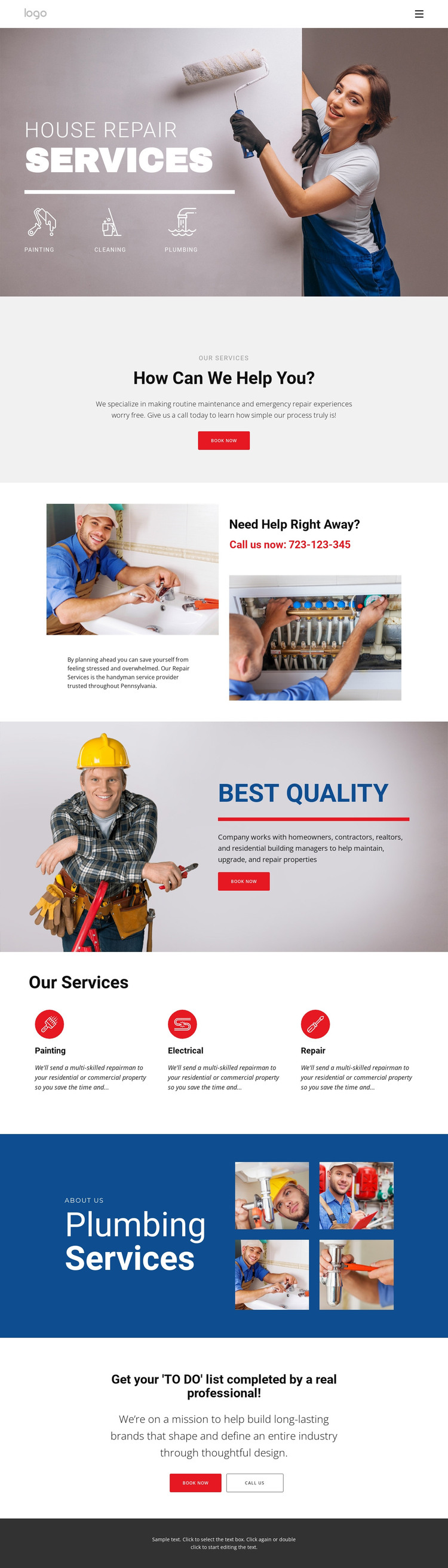
The page's strongest WordPress-oriented value comes from the way it separates permanent service information into recognizable content areas. The hero introduces Painting, Cleaning, and Plumbing, while the repeated Our Services items present Painting, Electrical, and Repair with a consistent visual treatment. This arrangement can guide page-oriented service content or recurring category cards without claiming that WordPress Posts, categories, or blog structures already exist in the template.
The supporting sections offer different content relationships for a managed site. Need Help Right Away? combines repair imagery, maintenance copy, and a phone callout, making it a natural contact-focused region. Best Quality pairs another image with a quality statement and Book now, while the four-image Plumbing Services showcase provides a visual content area that can be maintained alongside service descriptions. These roles are materially different from the opening hero and help preserve a coherent theme structure as content changes.
The centered booking prompt and final Book now/CALL US block give the page two clear response regions, while the navigation and dark footer frame the presentation. A WordPress project could use this design direction for permanent service pages and regularly updated supporting content, but the verified analysis does not establish a blog or post area. The theme interpretation therefore rests on service content, repeated visual areas, navigation, and contact-focused page organization rather than CMS terminology alone.
Customize with Nicepage
Open this ready-made template in the WordPress Website Builder and customize it visually in the Nicepage editor. Replace demo content, edit page sections, and adapt the design to your project without rebuilding the template from scratch.
Manage and Edit This Theme in WordPress
Customize and Install the WordPress Theme
Start with this ready-made theme instead of building the WordPress design from scratch. Customize its layout, content, typography, images, sections, and other design elements visually in Nicepage editor, then export and install the WordPress Theme, Plugin, and Pages on your WordPress site. The Nicepage WordPress Plugin lets you continue working with the site after installation.
Edit the Theme Directly in WordPress
After installation, you can edit the WordPress Theme directly in WordPress with the Nicepage WordPress Plugin. Use Site Style to customize site Colors, Fonts, Header, Footer, Blog, and Post Page Templates while working within your WordPress website.
Edit WordPress Pages Visually
Use the Nicepage WordPress Plugin to edit page content directly from the WordPress admin area. Open a WordPress Page with Nicepage and visually change its text, images, sections, and other page elements while continuing to manage the Page through WordPress.
WordPress Content and Theme Integration
Use the customized theme with WordPress Pages, Posts, Blog and Post Templates, menus, widgets, and other CMS-managed content. Shared theme elements such as Colors, Fonts, Header, Footer, Blog, and Post Page Templates can be managed as part of the overall site design, while WordPress provides the CMS environment for managing site content.
This workflow combines a ready-made WordPress Theme with visual customization, direct theme editing in WordPress, and continued content management through the Nicepage WordPress Plugin.





















