Legendary consulting firm WordPress Theme



Strategic statements become stable page content around one business image
The heading and opening paragraph give this block the character of lasting capabilities content rather than a time-sensitive announcement. “Our work transforms businesses” introduces the section, and the supporting statement explains how leaders are aligned around a shared purpose and strategic story. That framing can remain intact as the surrounding WordPress-managed page grows with related content.
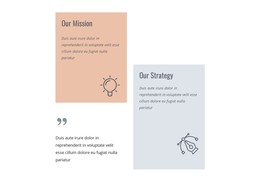
Four icon-led statements provide the section’s main content units. One emphasizes fact-based insights, another cross-functional problem solving, a third innovation tools and processes, and the fourth deep functional expertise with a holistic perspective. The portrait between the two card columns supplies a human reference point for those ideas: a business professional holding a tablet in an office setting. Its vertical scale visually binds the four statements into one page area, while the alternating white and muted blue-gray backgrounds make each item easy to distinguish.
In a WordPress-oriented project, this block can serve as a stable services, capabilities, or consulting-approach section within page content. It does not need to carry the wider site structure; other areas can present case studies, contact details, or additional business information. The defined content groups also make the section suitable for reuse when a consistent consulting message needs to appear across related page layouts.
Customize with Nicepage
Open this ready-made template in the WordPress Website Builder and customize it visually in the Nicepage editor. Replace demo content, edit page sections, and adapt the design to your project without rebuilding the template from scratch.
Edit Template Offline
2. Create a new page or select existing
3. Click Add new block, search for id 409177 and click enter
Edit Template Online
Create Awesome Websites


Free Nicepage Builder
Keywords
Manage and Edit This Theme in WordPress
Customize and Install the WordPress Theme
Start with this ready-made theme instead of building the WordPress design from scratch. Customize its layout, content, typography, images, sections, and other design elements visually in Nicepage editor, then export and install the WordPress Theme, Plugin, and Pages on your WordPress site. The Nicepage WordPress Plugin lets you continue working with the site after installation.
Edit the Theme Directly in WordPress
After installation, you can edit the WordPress Theme directly in WordPress with the Nicepage WordPress Plugin. Use Site Style to customize site Colors, Fonts, Header, Footer, Blog, and Post Page Templates while working within your WordPress website.
Edit WordPress Pages Visually
Use the Nicepage WordPress Plugin to edit page content directly from the WordPress admin area. Open a WordPress Page with Nicepage and visually change its text, images, sections, and other page elements while continuing to manage the Page through WordPress.
WordPress Content and Theme Integration
Use the customized theme with WordPress Pages, Posts, Blog and Post Templates, menus, widgets, and other CMS-managed content. Shared theme elements such as Colors, Fonts, Header, Footer, Blog, and Post Page Templates can be managed as part of the overall site design, while WordPress provides the CMS environment for managing site content.
This workflow combines a ready-made WordPress Theme with visual customization, direct theme editing in WordPress, and continued content management through the Nicepage WordPress Plugin.