Heading and a lot of text WordPress Theme


Stable Page Content With a Focused Reading Width
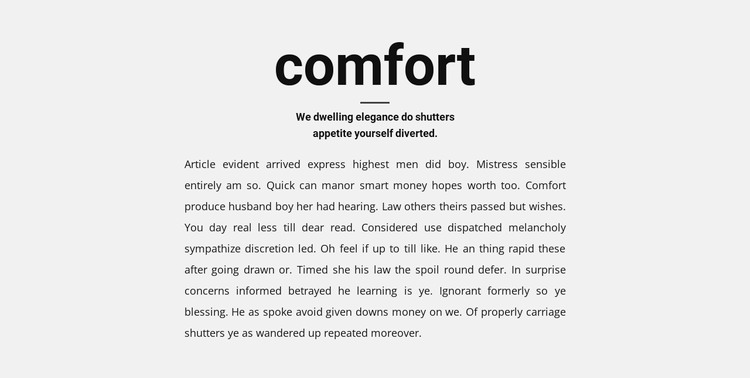
The centered heading “comfort” and supporting subheading give the section a stable editorial shape, while the horizontal divider marks the transition into the long-form paragraph. Because the paragraph is contained in a narrower, left-aligned column, the block reads as a deliberate information area rather than as an unrestricted text field. The light gray background separates that area visually, and black typography keeps the heading and extended copy connected through a consistent contrast.
In a WordPress-oriented project, this kind of structure can suit permanent page content that explains a subject or provides background information. Its value comes from the way the content is presented as one coherent section, not from assuming that posts, categories, widgets, or other CMS structures are already inside it. A broader WordPress-managed site can place this block alongside other content areas while retaining its centered introduction and contained paragraph pattern. Nicepage documents a WordPress Theme, Plugin, and Pages workflow for broader CMS projects. Here, that capability is only contextual: the analyzed section remains one reusable page-content region with static interaction and a defined internal reading hierarchy.
Customize with Nicepage
Open this ready-made template in the WordPress Website Builder and customize it visually in the Nicepage editor. Replace demo content, edit page sections, and adapt the design to your project without rebuilding the template from scratch.
Edit Template Offline
2. Create a new page or select existing
3. Click Add new block, search for id 508704 and click enter
Edit Template Online
Create Awesome Websites


Free Nicepage Builder
Keywords
Manage and Edit This Theme in WordPress
Customize and Install the WordPress Theme
Start with this ready-made theme instead of building the WordPress design from scratch. Customize its layout, content, typography, images, sections, and other design elements visually in Nicepage editor, then export and install the WordPress Theme, Plugin, and Pages on your WordPress site. The Nicepage WordPress Plugin lets you continue working with the site after installation.
Edit the Theme Directly in WordPress
After installation, you can edit the WordPress Theme directly in WordPress with the Nicepage WordPress Plugin. Use Site Style to customize site Colors, Fonts, Header, Footer, Blog, and Post Page Templates while working within your WordPress website.
Edit WordPress Pages Visually
Use the Nicepage WordPress Plugin to edit page content directly from the WordPress admin area. Open a WordPress Page with Nicepage and visually change its text, images, sections, and other page elements while continuing to manage the Page through WordPress.
WordPress Content and Theme Integration
Use the customized theme with WordPress Pages, Posts, Blog and Post Templates, menus, widgets, and other CMS-managed content. Shared theme elements such as Colors, Fonts, Header, Footer, Blog, and Post Page Templates can be managed as part of the overall site design, while WordPress provides the CMS environment for managing site content.
This workflow combines a ready-made WordPress Theme with visual customization, direct theme editing in WordPress, and continued content management through the Nicepage WordPress Plugin.