Web design experts WordPress Theme


Edit Template Offline
2. Create new page and search for id 6236636
Edit Template Online
Create Awesome Websites


Free Nicepage Builder
Keywords
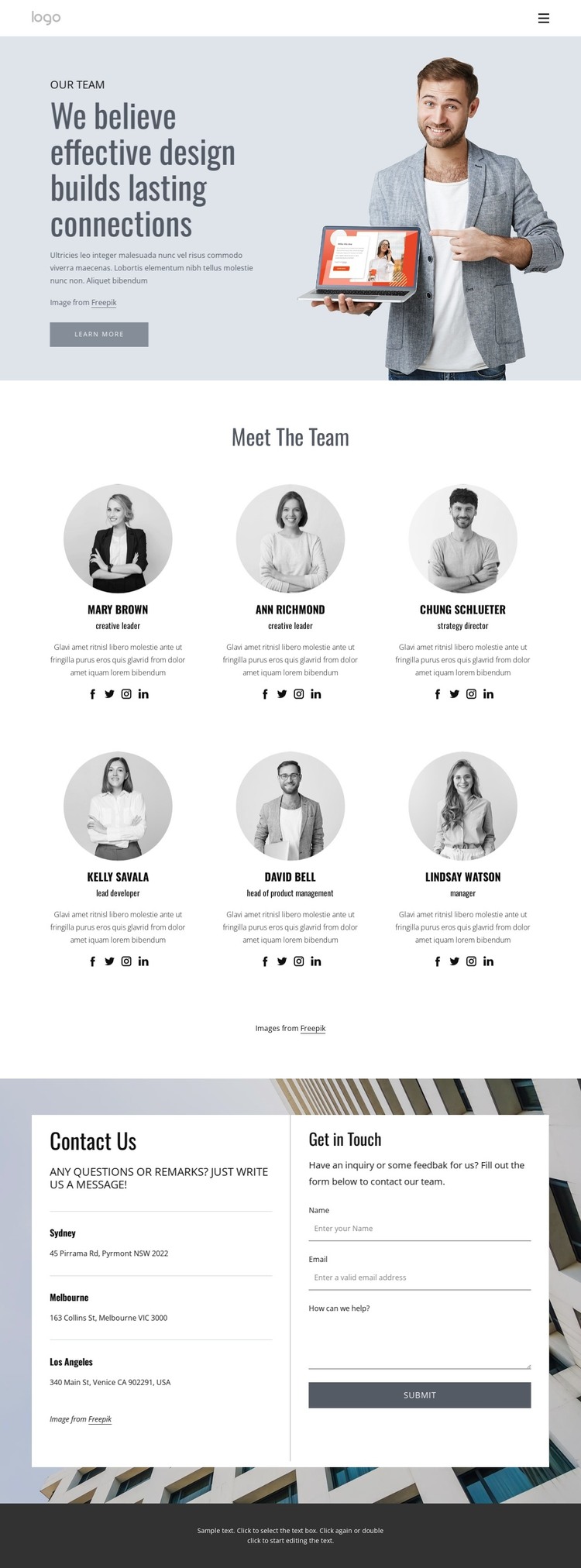
Profile cards turn the team page into organized WordPress content
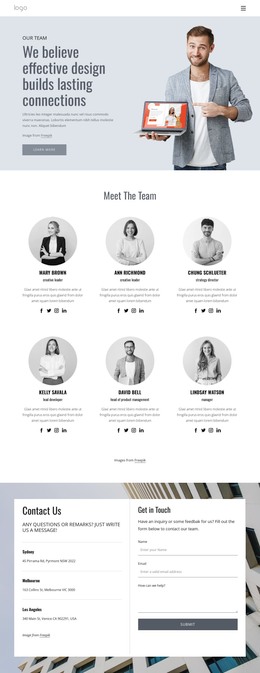
The six profile cards provide the clearest content structure for interpreting this design as a WordPress theme. Each card combines a circular portrait with a role, description, and social links, creating repeated page content that can remain visually coordinated as the team information changes. The cards are introduced by a dedicated Meet The Team section, so the people-focused content has a defined place within the page rather than being mixed into the hero or footer.
The surrounding areas support permanent page content and shared site context. The split hero contains the team introduction, supporting copy, large portrait, and Learn More button, while the two-row header keeps the logo, navigation, email, and phone details visible as shared elements. In the contact section, three office locations appear beside a form with name, email, and message inputs. That pairing gives the design separate content areas for organizational information and visitor communication without claiming that any additional CMS structures already exist. The dark footer continues the shared visual system through a brand statement, Quick Links, address, email, phone, and social links. A WordPress-oriented project can therefore use the theme as a coordinated environment for page content, profile-style information, locations, and contact content, while preserving the muted blue-gray palette, spacious composition, condensed typography, and circular portrait treatment that define the original design.
Customize with Nicepage
Open this ready-made template in the WordPress Website Builder and customize it visually in the Nicepage editor. Replace demo content, edit page sections, and adapt the design to your project without rebuilding the template from scratch.
Manage and Edit This Theme in WordPress
Customize and Install the WordPress Theme
Start with this ready-made theme instead of building the WordPress design from scratch. Customize its layout, content, typography, images, sections, and other design elements visually in Nicepage editor, then export and install the WordPress Theme, Plugin, and Pages on your WordPress site. The Nicepage WordPress Plugin lets you continue working with the site after installation.
Edit the Theme Directly in WordPress
After installation, you can edit the WordPress Theme directly in WordPress with the Nicepage WordPress Plugin. Use Site Style to customize site Colors, Fonts, Header, Footer, Blog, and Post Page Templates while working within your WordPress website.
Edit WordPress Pages Visually
Use the Nicepage WordPress Plugin to edit page content directly from the WordPress admin area. Open a WordPress Page with Nicepage and visually change its text, images, sections, and other page elements while continuing to manage the Page through WordPress.
WordPress Content and Theme Integration
Use the customized theme with WordPress Pages, Posts, Blog and Post Templates, menus, widgets, and other CMS-managed content. Shared theme elements such as Colors, Fonts, Header, Footer, Blog, and Post Page Templates can be managed as part of the overall site design, while WordPress provides the CMS environment for managing site content.
This workflow combines a ready-made WordPress Theme with visual customization, direct theme editing in WordPress, and continued content management through the Nicepage WordPress Plugin.