
Right solutions for business WordPress Theme


Edit Template Offline
2. Create new page and search for id 102753
Edit Template Online
Create Awesome Websites


Free Nicepage Builder
Keywords
Page Content, Repeated Features, and Inquiry Areas in One Theme Direction
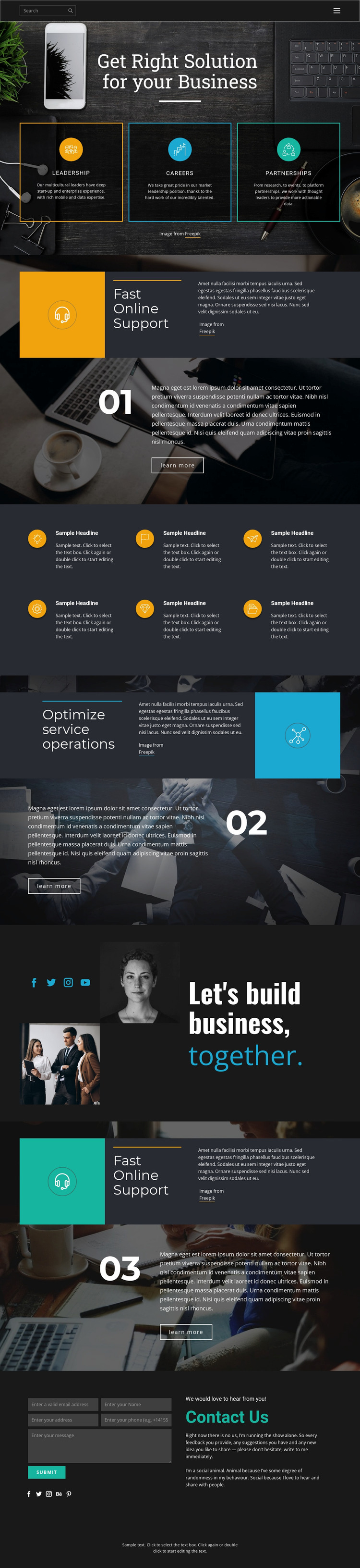
The design gives a WordPress-oriented project several stable page-content areas to work with. The hero organizes leadership, careers, and partnerships as three parallel cards, making them distinct from the larger service explanations that follow. Fast Online Support and Optimize service operations each have their own heading, numbered marker, supporting copy, imagery, and learn more action. This separation can help permanent business information remain readable as content is revised or expanded, without treating the entire page as one long text field.
The six-item feature list adds a repeated content pattern that could support capabilities or operational details. Its circular icons and compact text differ from the image-led split sections, so it provides a useful secondary format within the same theme direction. The collaboration statement and image collage then introduce a broader business context, while social links connect the page to external communication channels. These are verified design areas; the analysis does not establish that WordPress Posts, categories, or blog structures already exist.
The closing Contact Us block gives the page a defined content-and-inquiry relationship. An introductory message sits beside the form and Submit action, with social links continuing the communication theme. In a WordPress project, these page areas can remain visually connected while content is maintained through the CMS. Nicepage’s WordPress Plugin is an optional bridge for editing compatible page content in WordPress, but the main value of this theme remains the specific arrangement of service information, repeated features, imagery, and contact content.
Customize with Nicepage
Open this ready-made template in the WordPress Website Builder and customize it visually in the Nicepage editor. Replace demo content, edit page sections, and adapt the design to your project without rebuilding the template from scratch.
Manage and Edit This Theme in WordPress
Customize and Install the WordPress Theme
Start with this ready-made theme instead of building the WordPress design from scratch. Customize its layout, content, typography, images, sections, and other design elements visually in Nicepage editor, then export and install the WordPress Theme, Plugin, and Pages on your WordPress site. The Nicepage WordPress Plugin lets you continue working with the site after installation.
Edit the Theme Directly in WordPress
After installation, you can edit the WordPress Theme directly in WordPress with the Nicepage WordPress Plugin. Use Site Style to customize site Colors, Fonts, Header, Footer, Blog, and Post Page Templates while working within your WordPress website.
Edit WordPress Pages Visually
Use the Nicepage WordPress Plugin to edit page content directly from the WordPress admin area. Open a WordPress Page with Nicepage and visually change its text, images, sections, and other page elements while continuing to manage the Page through WordPress.
WordPress Content and Theme Integration
Use the customized theme with WordPress Pages, Posts, Blog and Post Templates, menus, widgets, and other CMS-managed content. Shared theme elements such as Colors, Fonts, Header, Footer, Blog, and Post Page Templates can be managed as part of the overall site design, while WordPress provides the CMS environment for managing site content.
This workflow combines a ready-made WordPress Theme with visual customization, direct theme editing in WordPress, and continued content management through the Nicepage WordPress Plugin.





















