Experienced and passionate team WordPress Theme


A Vertical Team List for Stable Page Content
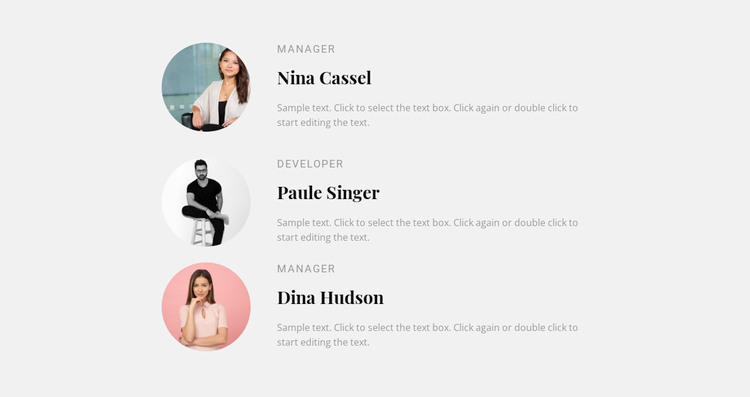
The single-column arrangement gives this block a natural role as stable team content within a WordPress-managed page. Three repeated profiles appear in the same visual pattern, with each circular portrait introducing a person before the adjacent role label, prominent name, and supporting paragraph provide context. This repeated structure is well suited to a services, company, or professional-information page that needs to identify people without compressing them into small cards.
The light gray background separates the team list from nearby page content, while the dark serif names create a strong reading anchor. Muted uppercase roles can be scanned quickly, and the generous spacing gives each paragraph room to support the profile without creating a long uninterrupted text wall. Since the interaction is static, all three entries remain available in the initial section rather than depending on a carousel, tab, or expandable control.
For a WordPress-oriented project, the block can function as a reusable visual content area on a permanent page while the wider site manages its other content around it. The WordPress context applies to the surrounding page and publishing environment; this asset remains one team section, not a complete theme. The sample names, roles, portraits, and descriptions are replaceable content, but the portrait-to-text pattern can remain consistent. That makes the block useful when a page needs a recognizable people section with enough room for individual descriptions and a clear progression from one profile to the next.
Customize with Nicepage
Open this ready-made template in the WordPress Website Builder and customize it visually in the Nicepage editor. Replace demo content, edit page sections, and adapt the design to your project without rebuilding the template from scratch.
Edit Template Offline
2. Create a new page or select existing
3. Click Add new block, search for id 86004 and click enter
Edit Template Online
Create Awesome Websites


Free Nicepage Builder
Keywords
Manage and Edit This Theme in WordPress
Customize and Install the WordPress Theme
Start with this ready-made theme instead of building the WordPress design from scratch. Customize its layout, content, typography, images, sections, and other design elements visually in Nicepage editor, then export and install the WordPress Theme, Plugin, and Pages on your WordPress site. The Nicepage WordPress Plugin lets you continue working with the site after installation.
Edit the Theme Directly in WordPress
After installation, you can edit the WordPress Theme directly in WordPress with the Nicepage WordPress Plugin. Use Site Style to customize site Colors, Fonts, Header, Footer, Blog, and Post Page Templates while working within your WordPress website.
Edit WordPress Pages Visually
Use the Nicepage WordPress Plugin to edit page content directly from the WordPress admin area. Open a WordPress Page with Nicepage and visually change its text, images, sections, and other page elements while continuing to manage the Page through WordPress.
WordPress Content and Theme Integration
Use the customized theme with WordPress Pages, Posts, Blog and Post Templates, menus, widgets, and other CMS-managed content. Shared theme elements such as Colors, Fonts, Header, Footer, Blog, and Post Page Templates can be managed as part of the overall site design, while WordPress provides the CMS environment for managing site content.
This workflow combines a ready-made WordPress Theme with visual customization, direct theme editing in WordPress, and continued content management through the Nicepage WordPress Plugin.