
Recruiting agency with good experience WordPress Theme


Edit Template Offline
2. Create new page and search for id 325936
Edit Template Online
Create Awesome Websites


Free Nicepage Builder
Keywords
Service and Editorial Areas Give the Theme Manageable Content Roles
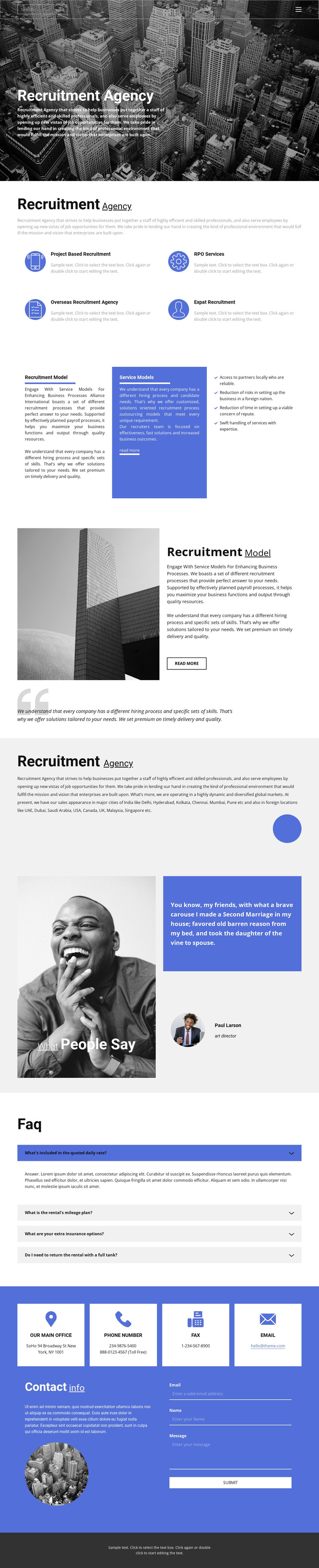
The service section provides four clear page-content roles around project-based recruitment, RPO services, overseas recruitment, and expat recruitment. These categories can remain distinct when the agency replaces the sample descriptions with accurate information. The recruitment-model areas add longer-form explanatory content through adjacent text panels, a blue service panel, a four-item benefits list, and a separate image-and-text process section. This combination gives the theme both repeatable content units and space for more detailed agency explanations.
The geographic overview can hold permanent agency information about locations in India and international markets, while the testimonial and FAQ accordion provide separate content areas for reassurance and recurring questions. The closing contact region is especially clear: four contact-information cards precede descriptive text and an inquiry form that requests an email, name, and message. Navigation, mobile navigation, and the footer supply shared site elements around these page areas. For a WordPress-managed project, the design can therefore be interpreted through durable agency content first, with the possibility of adding regularly updated material later without claiming that posts or blog structures already exist in the template. The visual relationship between blue accents, grayscale imagery, and pale surfaces gives those content areas a consistent theme context, while the underlying sample names, contact values, testimonial attribution, and unrelated FAQ wording should be replaced rather than treated as verified business data.
Customize with Nicepage
Open this ready-made template in the WordPress Website Builder and customize it visually in the Nicepage editor. Replace demo content, edit page sections, and adapt the design to your project without rebuilding the template from scratch.
Manage and Edit This Theme in WordPress
Customize and Install the WordPress Theme
Start with this ready-made theme instead of building the WordPress design from scratch. Customize its layout, content, typography, images, sections, and other design elements visually in Nicepage editor, then export and install the WordPress Theme, Plugin, and Pages on your WordPress site. The Nicepage WordPress Plugin lets you continue working with the site after installation.
Edit the Theme Directly in WordPress
After installation, you can edit the WordPress Theme directly in WordPress with the Nicepage WordPress Plugin. Use Site Style to customize site Colors, Fonts, Header, Footer, Blog, and Post Page Templates while working within your WordPress website.
Edit WordPress Pages Visually
Use the Nicepage WordPress Plugin to edit page content directly from the WordPress admin area. Open a WordPress Page with Nicepage and visually change its text, images, sections, and other page elements while continuing to manage the Page through WordPress.
WordPress Content and Theme Integration
Use the customized theme with WordPress Pages, Posts, Blog and Post Templates, menus, widgets, and other CMS-managed content. Shared theme elements such as Colors, Fonts, Header, Footer, Blog, and Post Page Templates can be managed as part of the overall site design, while WordPress provides the CMS environment for managing site content.
This workflow combines a ready-made WordPress Theme with visual customization, direct theme editing in WordPress, and continued content management through the Nicepage WordPress Plugin.





















