
Futuristic standout business WordPress Theme


Edit Template Offline
2. Create new page and search for id 61991
Edit Template Online
Create Awesome Websites


Free Nicepage Builder
Keywords
Page-Oriented Company Content Leaves Room for WordPress Expansion
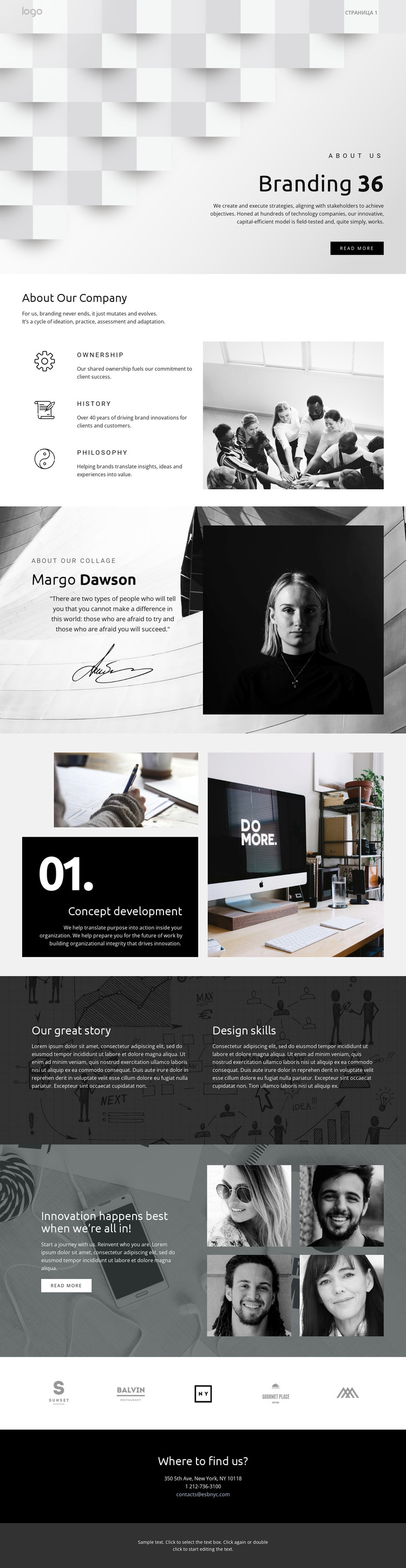
The company overview is the clearest permanent content area in this design. Ownership, History, and Philosophy are presented as three distinct principles beside a large photograph, making the section suitable for page-oriented company information rather than a single undifferentiated text block. The profile quote adds another content type through its combination of editorial statement, signature image, and portrait, while Concept development identifies a specific capability that could anchor a separate expertise-focused area.
The page also contains repeated visual content that can support an expanding editorial structure. The four-image arrangement beside the invitation provides a showcase zone, and the five brand marks form a compact context section. Our great story adds Design skills and another text-led theme over a dark photographic background, creating a different content relationship from the company overview. These areas can remain part of one visual system while the site's page content grows; the analysis does not verify existing WordPress Posts, categories, or blog structures.
The navigation header and closing contact section help connect the content into a site environment. The header includes a logo area, page link, and mobile menu control, while the final black block presents an email link, telephone number, and street address. A WordPress theme interpretation can therefore center on permanent profile pages and reusable visual regions, with the original branding design continuing around future content rather than being reduced to a CMS label.
Customize with Nicepage
Open this ready-made template in the WordPress Website Builder and customize it visually in the Nicepage editor. Replace demo content, edit page sections, and adapt the design to your project without rebuilding the template from scratch.
Manage and Edit This Theme in WordPress
Customize and Install the WordPress Theme
Start with this ready-made theme instead of building the WordPress design from scratch. Customize its layout, content, typography, images, sections, and other design elements visually in Nicepage editor, then export and install the WordPress Theme, Plugin, and Pages on your WordPress site. The Nicepage WordPress Plugin lets you continue working with the site after installation.
Edit the Theme Directly in WordPress
After installation, you can edit the WordPress Theme directly in WordPress with the Nicepage WordPress Plugin. Use Site Style to customize site Colors, Fonts, Header, Footer, Blog, and Post Page Templates while working within your WordPress website.
Edit WordPress Pages Visually
Use the Nicepage WordPress Plugin to edit page content directly from the WordPress admin area. Open a WordPress Page with Nicepage and visually change its text, images, sections, and other page elements while continuing to manage the Page through WordPress.
WordPress Content and Theme Integration
Use the customized theme with WordPress Pages, Posts, Blog and Post Templates, menus, widgets, and other CMS-managed content. Shared theme elements such as Colors, Fonts, Header, Footer, Blog, and Post Page Templates can be managed as part of the overall site design, while WordPress provides the CMS environment for managing site content.
This workflow combines a ready-made WordPress Theme with visual customization, direct theme editing in WordPress, and continued content management through the Nicepage WordPress Plugin.





















