
Calendar with appointment schedule WordPress Theme


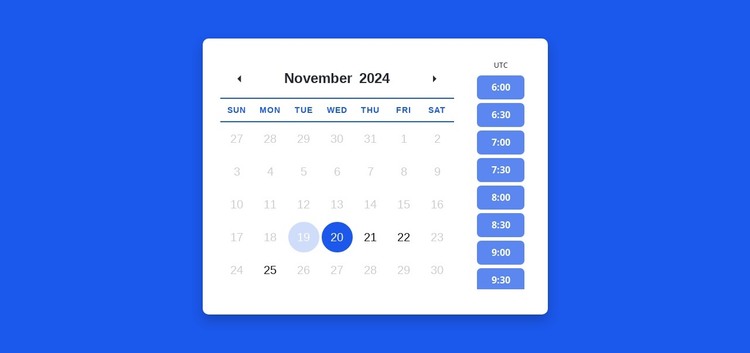
Stable Appointment Content With Separate Date and Time Groups
The monthly calendar and the adjacent time-slot list form stable, page-oriented content that can fit naturally into a WordPress-managed services or booking page. Weekday labels and date cells organize the first group, while the vertical time choices create a second group for the next scheduling decision. Keeping them within a rounded white card makes the section easy to recognize as one appointment area when other page content surrounds it.
The stronger blue selected date, lighter highlight, and blue time-slot buttons provide visual states that can remain consistent when the section is adapted to the project’s actual schedule. The displayed November 2024 month and sample times should be treated as demonstration values, not live appointment data. Their structural role is to show how the calendar communicates date context and how the time list sits beside it.
In a WordPress-oriented project, this block can remain a reusable section of permanent page content while the broader site manages related pages and editorial material. It is not a standalone WordPress Theme; it is a visual content region that can participate in a wider theme and page structure. Nicepage’s WordPress workflow can support that surrounding context, while the block retains its focused scheduling presentation.
Customize with Nicepage
Open this ready-made template in the WordPress Website Builder and customize it visually in the Nicepage editor. Replace demo content, edit page sections, and adapt the design to your project without rebuilding the template from scratch.
Edit Template Offline
2. Create a new page or select existing
3. Click Add new block, search for id 6390715 and click enter
Edit Template Online
Create Awesome Websites


Free Nicepage Builder
Keywords
Manage and Edit This Theme in WordPress
Customize and Install the WordPress Theme
Start with this ready-made theme instead of building the WordPress design from scratch. Customize its layout, content, typography, images, sections, and other design elements visually in Nicepage editor, then export and install the WordPress Theme, Plugin, and Pages on your WordPress site. The Nicepage WordPress Plugin lets you continue working with the site after installation.
Edit the Theme Directly in WordPress
After installation, you can edit the WordPress Theme directly in WordPress with the Nicepage WordPress Plugin. Use Site Style to customize site Colors, Fonts, Header, Footer, Blog, and Post Page Templates while working within your WordPress website.
Edit WordPress Pages Visually
Use the Nicepage WordPress Plugin to edit page content directly from the WordPress admin area. Open a WordPress Page with Nicepage and visually change its text, images, sections, and other page elements while continuing to manage the Page through WordPress.
WordPress Content and Theme Integration
Use the customized theme with WordPress Pages, Posts, Blog and Post Templates, menus, widgets, and other CMS-managed content. Shared theme elements such as Colors, Fonts, Header, Footer, Blog, and Post Page Templates can be managed as part of the overall site design, while WordPress provides the CMS environment for managing site content.
This workflow combines a ready-made WordPress Theme with visual customization, direct theme editing in WordPress, and continued content management through the Nicepage WordPress Plugin.









































