We are professional barbers WordPress Theme


Edit Template Offline
2. Create new page and search for id 6407394
Edit Template Online
Create Awesome Websites


Free Nicepage Builder
Keywords
Team profiles and service tabs create durable page content
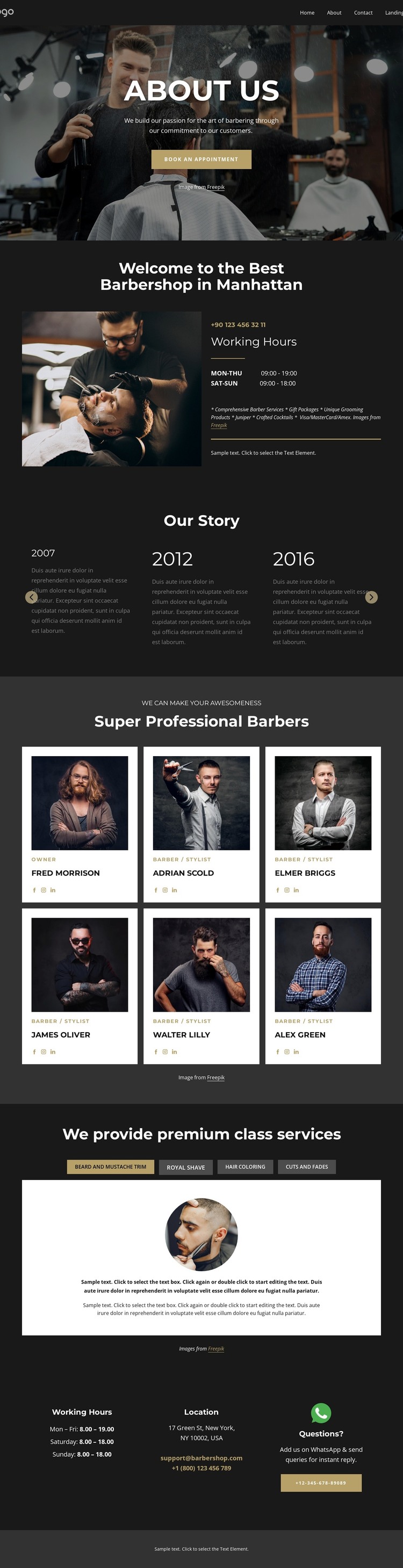
The page separates durable barbershop information into recognizable content areas. The welcome section presents the business context through a barbering image, working hours, phone details, and service notes. The six profile cards then provide a repeated team structure, with portraits, roles, names, and social links giving each barber or stylist a consistent place within the page. This is different from the four service tabs, which organize the offer itself through beard and mustache trims, royal shaves, hair coloring, and cuts and fades.
The five dated story milestones add an editorial layer that can explain the business background without being confused with current staff or service information. The About Us hero and appointment button remain the page’s introduction, while the footer collects permanent contact-oriented content: location, email, phone numbers, hours, social links, and a questions prompt. These relationships create a practical division between page information, recurring profiles, service content, and shared site details.
For a WordPress-managed project, that division can support page-oriented content while leaving room for future editorial additions around the same visual system. This interpretation does not claim that WordPress Posts, blog templates, or categories already exist in the source design. Its value comes from the template’s clearly separated business content and its capacity to keep team, services, history, and contact information visually coordinated.
Customize with Nicepage
Open this ready-made template in the WordPress Website Builder and customize it visually in the Nicepage editor. Replace demo content, edit page sections, and adapt the design to your project without rebuilding the template from scratch.
Manage and Edit This Theme in WordPress
Customize and Install the WordPress Theme
Start with this ready-made theme instead of building the WordPress design from scratch. Customize its layout, content, typography, images, sections, and other design elements visually in Nicepage editor, then export and install the WordPress Theme, Plugin, and Pages on your WordPress site. The Nicepage WordPress Plugin lets you continue working with the site after installation.
Edit the Theme Directly in WordPress
After installation, you can edit the WordPress Theme directly in WordPress with the Nicepage WordPress Plugin. Use Site Style to customize site Colors, Fonts, Header, Footer, Blog, and Post Page Templates while working within your WordPress website.
Edit WordPress Pages Visually
Use the Nicepage WordPress Plugin to edit page content directly from the WordPress admin area. Open a WordPress Page with Nicepage and visually change its text, images, sections, and other page elements while continuing to manage the Page through WordPress.
WordPress Content and Theme Integration
Use the customized theme with WordPress Pages, Posts, Blog and Post Templates, menus, widgets, and other CMS-managed content. Shared theme elements such as Colors, Fonts, Header, Footer, Blog, and Post Page Templates can be managed as part of the overall site design, while WordPress provides the CMS environment for managing site content.
This workflow combines a ready-made WordPress Theme with visual customization, direct theme editing in WordPress, and continued content management through the Nicepage WordPress Plugin.