
Modern beauty fashion WordPress Theme


Edit Template Offline
2. Create new page and search for id 23526
Edit Template Online
Create Awesome Websites


Free Nicepage Builder
Keywords
Page Content and Recurring Site Elements Support WordPress Use
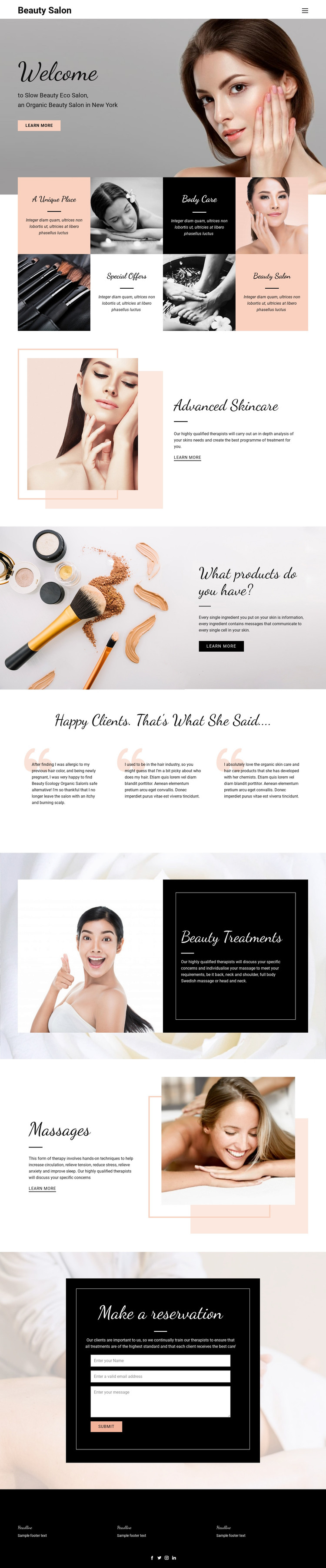
The homepage divides permanent salon information into content areas that can remain readable in a WordPress-managed site. The Welcome section introduces the salon, while the four-tile overview gives visitors a concise route into Body Care and Special Offers. Advanced Skincare, product and ingredient information, Beauty Treatments, and Massages then provide separate page-oriented subjects. This arrangement is useful when a project needs service information to remain distinct rather than blending every offering into one long paragraph.
The three testimonial panels form a different content relationship. They are grouped as client-focused proof after the main service explanations, so they can be treated as supporting content around the core salon pages rather than as another service category. The reservation form provides a clear contact area, and the header navigation offers the shared route between these subjects. At the bottom, three footer information columns and social links represented by Facebook, Twitter, Instagram, and LinkedIn icons establish recurring site elements.
For a WordPress theme interpretation, the design therefore maps naturally to permanent page content, reusable navigation, client-oriented supporting content, and a contact section. It does not prove that WordPress Posts, categories, or blog templates already exist. If regularly updated editorial content is added later, it would be an extension of the verified salon structure. Nicepage documents the WordPress Plugin as a way to edit a theme directly in WordPress, but the template-specific value here is the way its service and contact areas are already separated.
Customize with Nicepage
Open this ready-made template in the WordPress Website Builder and customize it visually in the Nicepage editor. Replace demo content, edit page sections, and adapt the design to your project without rebuilding the template from scratch.
Manage and Edit This Theme in WordPress
Customize and Install the WordPress Theme
Start with this ready-made theme instead of building the WordPress design from scratch. Customize its layout, content, typography, images, sections, and other design elements visually in Nicepage editor, then export and install the WordPress Theme, Plugin, and Pages on your WordPress site. The Nicepage WordPress Plugin lets you continue working with the site after installation.
Edit the Theme Directly in WordPress
After installation, you can edit the WordPress Theme directly in WordPress with the Nicepage WordPress Plugin. Use Site Style to customize site Colors, Fonts, Header, Footer, Blog, and Post Page Templates while working within your WordPress website.
Edit WordPress Pages Visually
Use the Nicepage WordPress Plugin to edit page content directly from the WordPress admin area. Open a WordPress Page with Nicepage and visually change its text, images, sections, and other page elements while continuing to manage the Page through WordPress.
WordPress Content and Theme Integration
Use the customized theme with WordPress Pages, Posts, Blog and Post Templates, menus, widgets, and other CMS-managed content. Shared theme elements such as Colors, Fonts, Header, Footer, Blog, and Post Page Templates can be managed as part of the overall site design, while WordPress provides the CMS environment for managing site content.
This workflow combines a ready-made WordPress Theme with visual customization, direct theme editing in WordPress, and continued content management through the Nicepage WordPress Plugin.





















