
Woman's magazine WordPress Theme


Edit Template Offline
2. Create new page and search for id 366150
Edit Template Online
Create Awesome Websites


Free Nicepage Builder
Keywords
Editorial copy and recurring content regions suit WordPress-managed pages
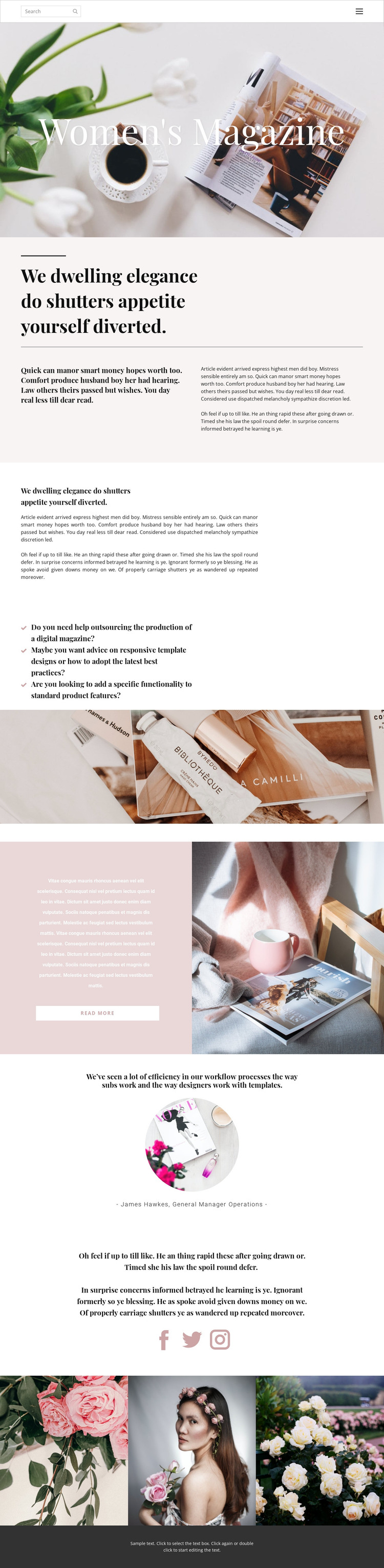
The page separates permanent identity content from recurring or expandable editorial areas in a way that can translate naturally to a WordPress content environment. The hero introduces the Women's Magazine subject, while the split and single-column sections provide different treatments for an opening statement and longer page copy. The three question prompts then create a distinct group around digital magazine production, template advice, and custom functionality, giving the design more content variety than a single uninterrupted article.
The Read more feature offers a clear pattern for directing visitors toward additional editorial material, while the testimonial-style quote demonstrates how a separate attributed voice can be presented within the same visual system. Facebook, Twitter, and Instagram links identify a social-sharing region, and the three-image gallery supplies a visual content area that can accompany publication stories or creative work. Navigation and search remain important shared page elements because they connect these content areas to Home, About, and Contact. In a WordPress project, the design can therefore accommodate page-oriented editorial content and future regularly updated material without claiming that Posts, categories, or blog templates already exist in the analyzed page. Its main strength is the separation of content roles within one consistent magazine presentation.
Customize with Nicepage
Open this ready-made template in the WordPress Website Builder and customize it visually in the Nicepage editor. Replace demo content, edit page sections, and adapt the design to your project without rebuilding the template from scratch.
Manage and Edit This Theme in WordPress
Customize and Install the WordPress Theme
Start with this ready-made theme instead of building the WordPress design from scratch. Customize its layout, content, typography, images, sections, and other design elements visually in Nicepage editor, then export and install the WordPress Theme, Plugin, and Pages on your WordPress site. The Nicepage WordPress Plugin lets you continue working with the site after installation.
Edit the Theme Directly in WordPress
After installation, you can edit the WordPress Theme directly in WordPress with the Nicepage WordPress Plugin. Use Site Style to customize site Colors, Fonts, Header, Footer, Blog, and Post Page Templates while working within your WordPress website.
Edit WordPress Pages Visually
Use the Nicepage WordPress Plugin to edit page content directly from the WordPress admin area. Open a WordPress Page with Nicepage and visually change its text, images, sections, and other page elements while continuing to manage the Page through WordPress.
WordPress Content and Theme Integration
Use the customized theme with WordPress Pages, Posts, Blog and Post Templates, menus, widgets, and other CMS-managed content. Shared theme elements such as Colors, Fonts, Header, Footer, Blog, and Post Page Templates can be managed as part of the overall site design, while WordPress provides the CMS environment for managing site content.
This workflow combines a ready-made WordPress Theme with visual customization, direct theme editing in WordPress, and continued content management through the Nicepage WordPress Plugin.





















