
Stylist biography WordPress Theme


Edit Template Offline
2. Create new page and search for id 1123050
Edit Template Online
Create Awesome Websites


Free Nicepage Builder
Keywords
Page content and visual work fit a personal WordPress theme structure
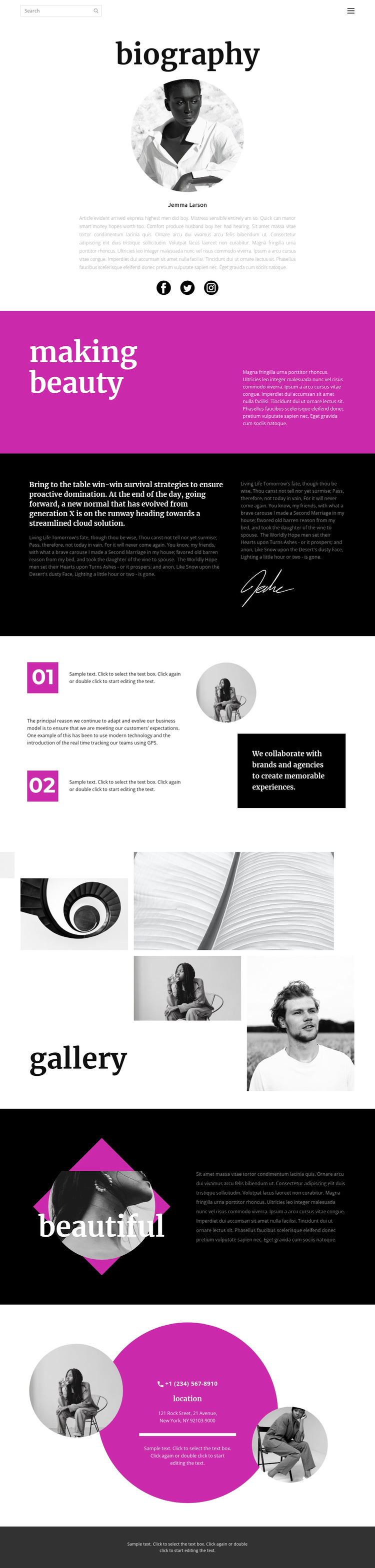
The biography and gallery give this design two different content roles that can remain connected within a WordPress-oriented site. The opening portrait, identity label, biography text, and social links work as permanent page content introducing the individual. The magenta creative statement, dark editorial passage, signature graphic, and two numbered principles extend that page content with a defined point of view rather than treating the profile as a simple image-and-text panel.
The four photographic panels create a separate visual-work area that could be maintained as part of the same theme direction. Its asymmetric arrangement is important because it gives the portfolio content a distinctive presentation, while the later layered circular image offers a second image-led content area with a different visual role. The collaboration message can remain alongside the principles as relationship-focused page content, without claiming that a team or service catalogue already exists.
The location block provides a practical closing region with phone, location, address, and portraits. In a WordPress project, that page-oriented contact content could sit alongside additional editorial or portfolio material if the site later expands, while the shared header, navigation, social links, and footer preserve continuity. Nicepage’s WordPress Plugin is relevant when the project needs to edit the theme directly in WordPress, but the verified template facts remain the basis for this content interpretation.
Customize with Nicepage
Open this ready-made template in the WordPress Website Builder and customize it visually in the Nicepage editor. Replace demo content, edit page sections, and adapt the design to your project without rebuilding the template from scratch.
Manage and Edit This Theme in WordPress
Customize and Install the WordPress Theme
Start with this ready-made theme instead of building the WordPress design from scratch. Customize its layout, content, typography, images, sections, and other design elements visually in Nicepage editor, then export and install the WordPress Theme, Plugin, and Pages on your WordPress site. The Nicepage WordPress Plugin lets you continue working with the site after installation.
Edit the Theme Directly in WordPress
After installation, you can edit the WordPress Theme directly in WordPress with the Nicepage WordPress Plugin. Use Site Style to customize site Colors, Fonts, Header, Footer, Blog, and Post Page Templates while working within your WordPress website.
Edit WordPress Pages Visually
Use the Nicepage WordPress Plugin to edit page content directly from the WordPress admin area. Open a WordPress Page with Nicepage and visually change its text, images, sections, and other page elements while continuing to manage the Page through WordPress.
WordPress Content and Theme Integration
Use the customized theme with WordPress Pages, Posts, Blog and Post Templates, menus, widgets, and other CMS-managed content. Shared theme elements such as Colors, Fonts, Header, Footer, Blog, and Post Page Templates can be managed as part of the overall site design, while WordPress provides the CMS environment for managing site content.
This workflow combines a ready-made WordPress Theme with visual customization, direct theme editing in WordPress, and continued content management through the Nicepage WordPress Plugin.





















