
Nature collection WordPress Theme


Edit Template Offline
2. Create new page and search for id 139802
Edit Template Online
Create Awesome Websites


Free Nicepage Builder
Keywords
Page-Oriented Fashion Content Extends From Collections to Contact
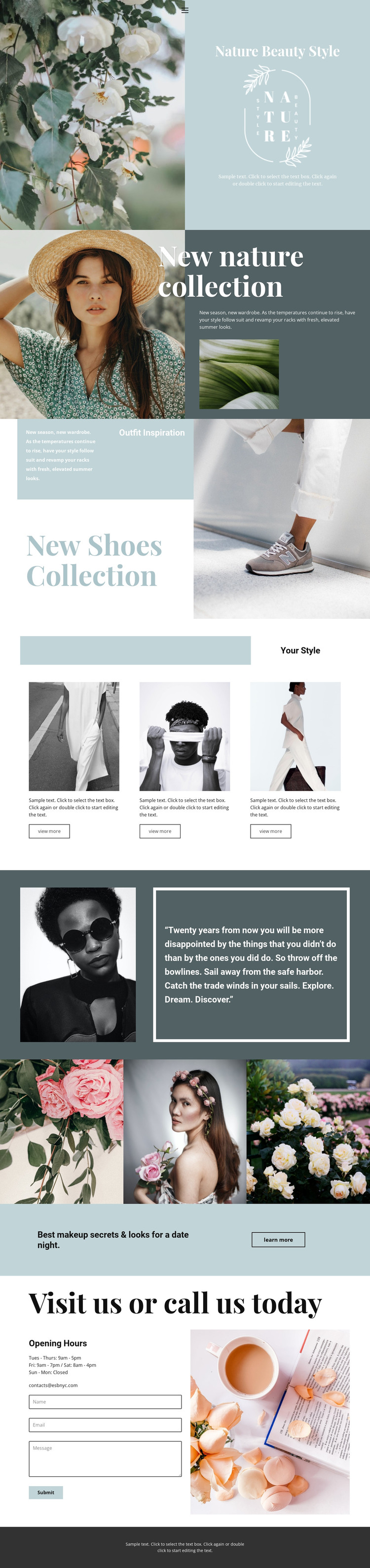
The seasonal collection and shoes sections provide two different kinds of permanent page content. The first combines a large lifestyle portrait, dark supporting panel, and smaller product image around the “New nature collection” heading. The second uses outfit-inspiration copy, stacked panels, and a large footwear image for “New Shoes Collection.” In a WordPress-managed project, these distinct areas can guide the organization of clothing and footwear content while keeping the same visual direction.
The three repeated style cards offer a useful pattern for recurring visual content. Each card has an image, description, and “view more” action, so the design can accommodate separate looks or collection entries without abandoning the established arrangement. The three-image floral and beauty gallery can support another permanent visual section, while the makeup promotion provides a focused editorial area with a “learn more” action. The quote panel adds a recognizable content break between these subjects.
Practical site content appears at the end through opening hours, an email contact, a contact form, and a submit action beside an interior photograph. Those elements give the page a clear contact destination alongside its visual material. WordPress can therefore be interpreted through the design’s page areas and repeated content relationships, not merely through a CMS label. The verified template supplies one page foundation; it does not by itself prove existing posts, categories, or a completed multi-page theme.
Customize with Nicepage
Open this ready-made template in the WordPress Website Builder and customize it visually in the Nicepage editor. Replace demo content, edit page sections, and adapt the design to your project without rebuilding the template from scratch.
Manage and Edit This Theme in WordPress
Customize and Install the WordPress Theme
Start with this ready-made theme instead of building the WordPress design from scratch. Customize its layout, content, typography, images, sections, and other design elements visually in Nicepage editor, then export and install the WordPress Theme, Plugin, and Pages on your WordPress site. The Nicepage WordPress Plugin lets you continue working with the site after installation.
Edit the Theme Directly in WordPress
After installation, you can edit the WordPress Theme directly in WordPress with the Nicepage WordPress Plugin. Use Site Style to customize site Colors, Fonts, Header, Footer, Blog, and Post Page Templates while working within your WordPress website.
Edit WordPress Pages Visually
Use the Nicepage WordPress Plugin to edit page content directly from the WordPress admin area. Open a WordPress Page with Nicepage and visually change its text, images, sections, and other page elements while continuing to manage the Page through WordPress.
WordPress Content and Theme Integration
Use the customized theme with WordPress Pages, Posts, Blog and Post Templates, menus, widgets, and other CMS-managed content. Shared theme elements such as Colors, Fonts, Header, Footer, Blog, and Post Page Templates can be managed as part of the overall site design, while WordPress provides the CMS environment for managing site content.
This workflow combines a ready-made WordPress Theme with visual customization, direct theme editing in WordPress, and continued content management through the Nicepage WordPress Plugin.





















