
Zara collection WordPress Theme


Edit Template Offline
2. Create new page and search for id 26229
Edit Template Online
Create Awesome Websites


Free Nicepage Builder
Keywords
Collection Content and Editorial Storytelling Fit a WordPress Theme Structure
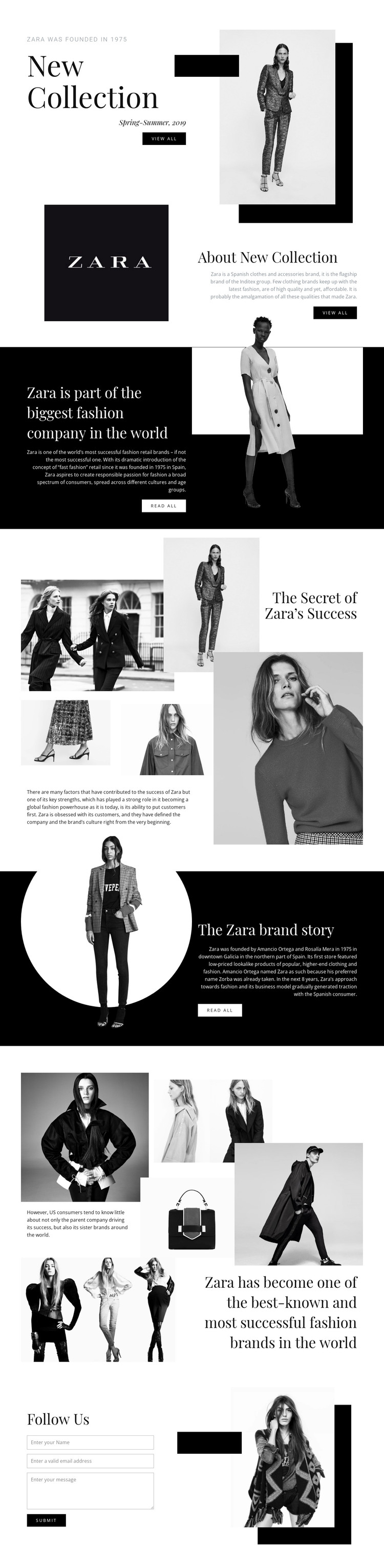
The seasonal and brand sections provide clear page-oriented content for a WordPress-managed fashion site. New Collection presents the Spring-Summer 2019 subject beside a fashion photograph and View all action, while About New Collection adds explanatory copy in a separate image-led block. These areas can be interpreted as permanent collection and about content without claiming that specific WordPress Pages or Posts already exist in the template.
The repeated editorial regions offer a second content relationship. The company-positioning section frames Zara as a Spanish clothing and accessories brand and the flagship brand of Inditex. The Secret of Zara's Success uses four fashion images to support a focused narrative, while The Zara brand story places historical copy beside a circular photograph. The later five-image collage expands the recognition story through fashion or product imagery and a large statement. This combination could support page content alongside regularly updated collection or editorial material while retaining one visual direction.
The Follow Us area contributes a contact form and Submit action as a clear communication block. In a WordPress theme interpretation, the important value is the separation between enduring brand content, image-rich collection storytelling, and visitor contact. The design can therefore serve as a visual environment for managed content without asserting unverified blog, post, category, or widget structures.
Customize with Nicepage
Open this ready-made template in the WordPress Website Builder and customize it visually in the Nicepage editor. Replace demo content, edit page sections, and adapt the design to your project without rebuilding the template from scratch.
Manage and Edit This Theme in WordPress
Customize and Install the WordPress Theme
Start with this ready-made theme instead of building the WordPress design from scratch. Customize its layout, content, typography, images, sections, and other design elements visually in Nicepage editor, then export and install the WordPress Theme, Plugin, and Pages on your WordPress site. The Nicepage WordPress Plugin lets you continue working with the site after installation.
Edit the Theme Directly in WordPress
After installation, you can edit the WordPress Theme directly in WordPress with the Nicepage WordPress Plugin. Use Site Style to customize site Colors, Fonts, Header, Footer, Blog, and Post Page Templates while working within your WordPress website.
Edit WordPress Pages Visually
Use the Nicepage WordPress Plugin to edit page content directly from the WordPress admin area. Open a WordPress Page with Nicepage and visually change its text, images, sections, and other page elements while continuing to manage the Page through WordPress.
WordPress Content and Theme Integration
Use the customized theme with WordPress Pages, Posts, Blog and Post Templates, menus, widgets, and other CMS-managed content. Shared theme elements such as Colors, Fonts, Header, Footer, Blog, and Post Page Templates can be managed as part of the overall site design, while WordPress provides the CMS environment for managing site content.
This workflow combines a ready-made WordPress Theme with visual customization, direct theme editing in WordPress, and continued content management through the Nicepage WordPress Plugin.





















