
Zara WordPress Theme


Edit Template Offline
2. Create new page and search for id 21448
Edit Template Online
Create Awesome Websites


Free Nicepage Builder
Keywords
Editorial Fashion Content and Product Areas Fit a WordPress-Oriented Structure
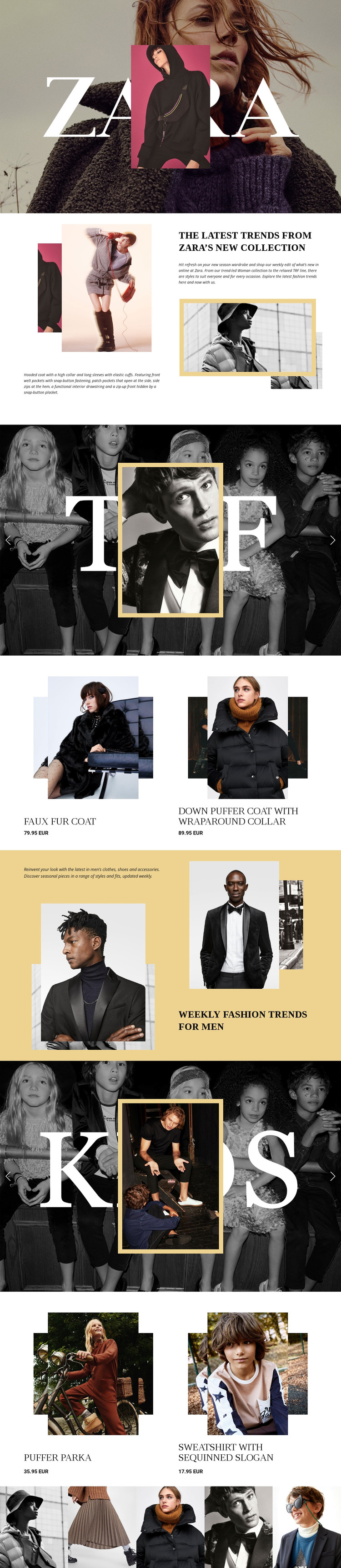
The page’s content can be read as a set of permanent fashion areas with room for future editorial updates. The women’s introduction provides descriptive collection context, and the TRF feature gives that context a stronger image-led identity before the two-item product area presents clothing names and displayed EUR prices. This combination separates explanatory fashion content from merchandise detail, which can help a WordPress project distinguish page-oriented material from content that may be updated more frequently.
The men’s trends section offers a second editorial area rather than simply repeating the women’s layout. Its warm-toned imagery and descriptive copy introduce another category, while the KIDS feature and following product presentations create a third audience-focused content path. The five-image closing strip adds a compact visual area that can support brand presentation without changing the main category sequence.
WordPress pages, posts, or theme content should not be claimed as existing elements of the source template. Instead, the verified sections provide a sensible content interpretation for a WordPress-managed site: editorial collection information, category features, product-oriented presentations, and shared visual direction can remain connected. The template’s serif hierarchy, monochrome photography, muted neutrals, gold accents, and open spacing give those different content areas a common theme character while leaving their editorial roles distinct.
Customize with Nicepage
Open this ready-made template in the WordPress Website Builder and customize it visually in the Nicepage editor. Replace demo content, edit page sections, and adapt the design to your project without rebuilding the template from scratch.
Manage and Edit This Theme in WordPress
Customize and Install the WordPress Theme
Start with this ready-made theme instead of building the WordPress design from scratch. Customize its layout, content, typography, images, sections, and other design elements visually in Nicepage editor, then export and install the WordPress Theme, Plugin, and Pages on your WordPress site. The Nicepage WordPress Plugin lets you continue working with the site after installation.
Edit the Theme Directly in WordPress
After installation, you can edit the WordPress Theme directly in WordPress with the Nicepage WordPress Plugin. Use Site Style to customize site Colors, Fonts, Header, Footer, Blog, and Post Page Templates while working within your WordPress website.
Edit WordPress Pages Visually
Use the Nicepage WordPress Plugin to edit page content directly from the WordPress admin area. Open a WordPress Page with Nicepage and visually change its text, images, sections, and other page elements while continuing to manage the Page through WordPress.
WordPress Content and Theme Integration
Use the customized theme with WordPress Pages, Posts, Blog and Post Templates, menus, widgets, and other CMS-managed content. Shared theme elements such as Colors, Fonts, Header, Footer, Blog, and Post Page Templates can be managed as part of the overall site design, while WordPress provides the CMS environment for managing site content.
This workflow combines a ready-made WordPress Theme with visual customization, direct theme editing in WordPress, and continued content management through the Nicepage WordPress Plugin.





















