
Step by step to style WordPress Theme


Edit Template Offline
2. Create new page and search for id 669539
Edit Template Online
Create Awesome Websites


Free Nicepage Builder
Keywords
Four Named Services Give the Theme a Strong Content Core
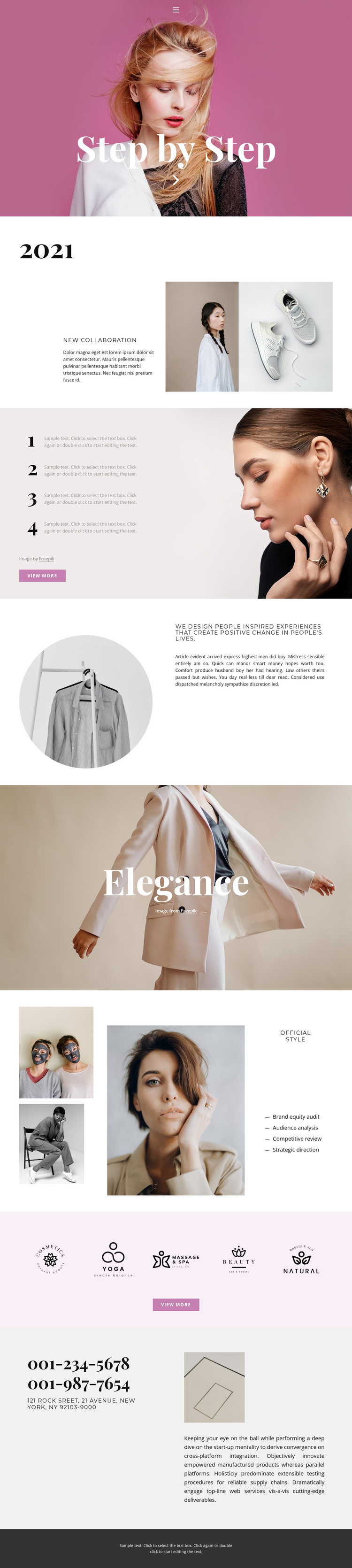
The Official Style section provides the clearest content core for a WordPress-oriented project. Its four named services—brand equity audit, audience analysis, competitive review, and strategic direction—are arranged as a vertical list beside an editorial image collage. That pairing separates readable service information from visual context, creating a section that can represent a stable page area while its wording and supporting imagery are adapted for the project.
Other parts of the design support different kinds of page content. Home, About, and Contact navigation identifies the main destinations, and the Step by Step hero gives the site an immediate introduction. The 2021 collaboration area combines a milestone heading, explanatory text, and two fashion images, making it distinct from the service list. Four numbered process items beside a portrait can present methodology, while the statement about People Inspired Experiences can carry the site’s central point of view. These areas offer more useful content relationships than a single undifferentiated homepage block.
The five visual brand marks create a compact showcase that can sit between strategy information and practical contact content. At the end, two displayed phone numbers, a New York location, supporting copy, and an image gather contact details into one recognizable region. The analysis confirms one underlying page rather than a complete multi-page WordPress site, but its navigation, service content, process explanation, showcase, and contact areas provide a coherent theme foundation for organizing permanent page content while preserving the editorial fashion direction.
Customize with Nicepage
Open this ready-made template in the WordPress Website Builder and customize it visually in the Nicepage editor. Replace demo content, edit page sections, and adapt the design to your project without rebuilding the template from scratch.
Manage and Edit This Theme in WordPress
Customize and Install the WordPress Theme
Start with this ready-made theme instead of building the WordPress design from scratch. Customize its layout, content, typography, images, sections, and other design elements visually in Nicepage editor, then export and install the WordPress Theme, Plugin, and Pages on your WordPress site. The Nicepage WordPress Plugin lets you continue working with the site after installation.
Edit the Theme Directly in WordPress
After installation, you can edit the WordPress Theme directly in WordPress with the Nicepage WordPress Plugin. Use Site Style to customize site Colors, Fonts, Header, Footer, Blog, and Post Page Templates while working within your WordPress website.
Edit WordPress Pages Visually
Use the Nicepage WordPress Plugin to edit page content directly from the WordPress admin area. Open a WordPress Page with Nicepage and visually change its text, images, sections, and other page elements while continuing to manage the Page through WordPress.
WordPress Content and Theme Integration
Use the customized theme with WordPress Pages, Posts, Blog and Post Templates, menus, widgets, and other CMS-managed content. Shared theme elements such as Colors, Fonts, Header, Footer, Blog, and Post Page Templates can be managed as part of the overall site design, while WordPress provides the CMS environment for managing site content.
This workflow combines a ready-made WordPress Theme with visual customization, direct theme editing in WordPress, and continued content management through the Nicepage WordPress Plugin.





















