
Avenir WordPress Theme


Edit Template Offline
2. Create new page and search for id 24490
Edit Template Online
Create Awesome Websites


Free Nicepage Builder
Keywords
Fashion explanations and recurring visual content suit a WordPress theme
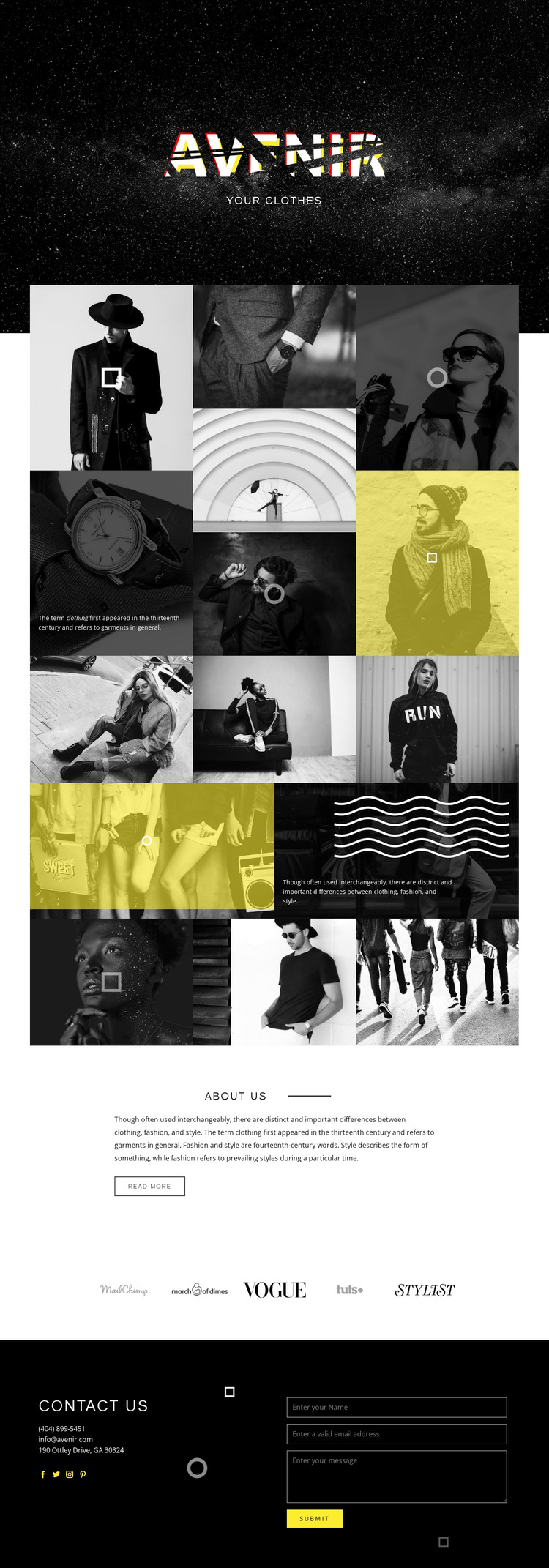
The clothing, fashion, and style discussion gives Avenir a clear set of page-oriented content areas for a WordPress project. The first collage can introduce clothing through a combination of images and short explanation, while the second develops the distinction between clothing, fashion, and style. Together, they create more editorial depth than a single promotional hero and leave room for the text and imagery to be maintained as the project’s subject develops.
The About Us section provides a stable informational area, and the five-logo strip can support publication or fashion references without competing with the main story. These sections are visually different but remain connected by the dark, high-contrast design language. The Contact Us block then gives the site a practical closing area, combining contact details, social links, and a message form for inquiries. In a WordPress-managed environment, this arrangement can separate enduring information from content that may be updated over time while preserving the same visual direction. The design does not require the addition of unverified blog or post structures to be useful; its existing collages, informational section, logo row, and contact area already define a workable content foundation. The theme’s main strength is keeping varied fashion content within one recognizable editorial system.
Customize with Nicepage
Open this ready-made template in the WordPress Website Builder and customize it visually in the Nicepage editor. Replace demo content, edit page sections, and adapt the design to your project without rebuilding the template from scratch.
Manage and Edit This Theme in WordPress
Customize and Install the WordPress Theme
Start with this ready-made theme instead of building the WordPress design from scratch. Customize its layout, content, typography, images, sections, and other design elements visually in Nicepage editor, then export and install the WordPress Theme, Plugin, and Pages on your WordPress site. The Nicepage WordPress Plugin lets you continue working with the site after installation.
Edit the Theme Directly in WordPress
After installation, you can edit the WordPress Theme directly in WordPress with the Nicepage WordPress Plugin. Use Site Style to customize site Colors, Fonts, Header, Footer, Blog, and Post Page Templates while working within your WordPress website.
Edit WordPress Pages Visually
Use the Nicepage WordPress Plugin to edit page content directly from the WordPress admin area. Open a WordPress Page with Nicepage and visually change its text, images, sections, and other page elements while continuing to manage the Page through WordPress.
WordPress Content and Theme Integration
Use the customized theme with WordPress Pages, Posts, Blog and Post Templates, menus, widgets, and other CMS-managed content. Shared theme elements such as Colors, Fonts, Header, Footer, Blog, and Post Page Templates can be managed as part of the overall site design, while WordPress provides the CMS environment for managing site content.
This workflow combines a ready-made WordPress Theme with visual customization, direct theme editing in WordPress, and continued content management through the Nicepage WordPress Plugin.





















