Modern Korean Skincare WordPress Theme


Edit Template Offline
2. Create new page and search for id 6672116
Edit Template Online
Create Awesome Websites


Free Nicepage Builder
Keywords
Product Content and Editorial Store Regions Share One Theme Direction
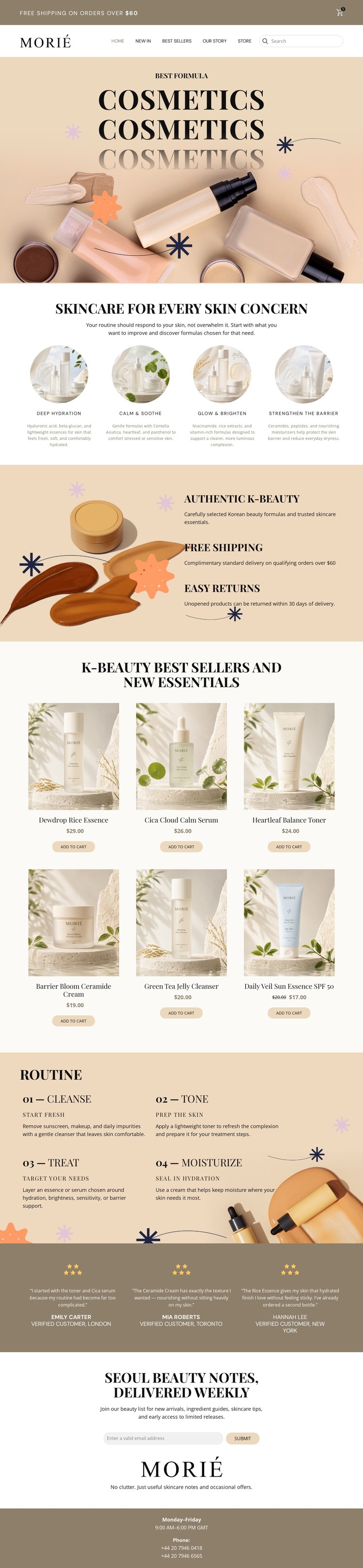
The page divides its content into areas that can support different kinds of ongoing storefront information. The Morié header establishes shared navigation, search, and cart context, while the four skincare concern categories organize the subject around Deep Hydration, Calm & Soothe, Glow & Brighten, and Strengthen the Barrier. Those categories provide a page-oriented framework for presenting skincare information without claiming that additional CMS structures already exist in the template.
The six product cards are the primary retail content, linking product imagery with names, prices, and add-to-cart actions. Around them, the four-step routine supplies a separate educational relationship: Cleanse, Tone, Treat, and Moisturize explain sequence rather than simply listing merchandise. The three testimonial entries add repeated customer-proof content, and the newsletter section creates a defined area for collecting subscriptions. These different content roles can coexist under the same visual system because cream surfaces, black editorial typography, and centered presentation repeat throughout the page.
The footer’s business hours and two phone numbers provide shared site information, while the benefits section communicates Authentic K-Beauty, Free Shipping, and Easy Returns. In a WordPress-oriented project, the design is most useful as a theme direction for permanent storefront content and related editorial material, not merely as a renamed CMS layout. Nicepage’s WordPress Plugin is an optional product bridge for editing a theme directly in WordPress, while the template-specific value remains its organized retail and editorial content pattern.
Customize with Nicepage
Open this ready-made template in the WordPress Website Builder and customize it visually in the Nicepage editor. Replace demo content, edit page sections, and adapt the design to your project without rebuilding the template from scratch.
Manage and Edit This Theme in WordPress
Customize and Install the WordPress Theme
Start with this ready-made theme instead of building the WordPress design from scratch. Customize its layout, content, typography, images, sections, and other design elements visually in Nicepage editor, then export and install the WordPress Theme, Plugin, and Pages on your WordPress site. The Nicepage WordPress Plugin lets you continue working with the site after installation.
Edit the Theme Directly in WordPress
After installation, you can edit the WordPress Theme directly in WordPress with the Nicepage WordPress Plugin. Use Site Style to customize site Colors, Fonts, Header, Footer, Blog, and Post Page Templates while working within your WordPress website.
Edit WordPress Pages Visually
Use the Nicepage WordPress Plugin to edit page content directly from the WordPress admin area. Open a WordPress Page with Nicepage and visually change its text, images, sections, and other page elements while continuing to manage the Page through WordPress.
WordPress Content and Theme Integration
Use the customized theme with WordPress Pages, Posts, Blog and Post Templates, menus, widgets, and other CMS-managed content. Shared theme elements such as Colors, Fonts, Header, Footer, Blog, and Post Page Templates can be managed as part of the overall site design, while WordPress provides the CMS environment for managing site content.
This workflow combines a ready-made WordPress Theme with visual customization, direct theme editing in WordPress, and continued content management through the Nicepage WordPress Plugin.